Prioritizing What Matters Most in your Organizational Context

Cathia Archidoit
Associate Software Engineer

Neena Sharma
Head of Product and Customer Marketing
-
 Copied!
 -
Copied!
-
Copied!



Security teams today have access to countless threat data sources, from internal tools like EDRs and NGFW to open-source and commercial feeds. Despite this, most teams feel overwhelmed and struggle with prioritizing intelligence effectively.
This intelligence overload paradox has real consequences: while teams spend hours daily sifting through threat feeds, Ponemon Institute found that 55% of significant security incidents involved threats that were actually present in organizations’ intelligence feeds but went un-actioned due to poor prioritization. The challenge isn’t obtaining threat intelligence, it’s transforming raw data into actionable, prioritized insights that align with an organization’s unique risk profile, critical assets, and operational context.
Priority Intelligence Requirements (PIRs) gather and prioritize the most critical and relevant information based on a given focus, helping you make informed intelligence-based decisions, achieve key objectives, assess potential risks and analyze crucial insights. By establishing clear PIRs, organizations can transform scattered data points into actionable intelligence, ensuring that teams spend their time and effort on information that directly impacts strategic outcomes.
TL;DR
- Gather and prioritize contextually relevant information: focus on threats of interest based on your organizational context, threat landscape, region and sectors.
- Process and enrich this intelligence to make it directly actionable for your teams: analyze events, content, and relationships concerning critical threats and key entities.
Key PIR capabilities
A Priority Intelligence Requirement (PIR) focuses on specific entities of interest and provides relevant information about them, enabling you to:
- List these entities
- Filter and sort them, particularly by their PIR score or PIR last score date evolution, to focus on most relevant entities and/or entities newly added in the PIR
- Access a news feed and history showing the most recent important events related to these entities
- View, filter, and sort containers containing them
- Explore various graphical representations, giving snapshots of your PIR content
OpenCTI Enterprise Edition (EE) includes options like AI Chatbot and natural language search to view and process threat intelligence based on priority requirements. Now we have added an exclusive option to create PIRs like below:
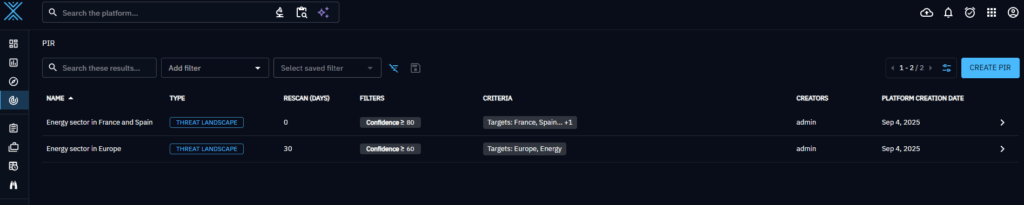
PIR creation and how entities of interest are determined
How are the entities of interest to focus on determined?
When creating a PIR, the user provides a name, a rescan period (defaulting to one month), and a set of criteria and filters that define the focus of the PIR. To be considered an entity of interest for a given PIR, an entity must match at least one of the specified criteria. In our example, the PIR focus will be ‘should target the Energy sector or the Europe region (criteria) with a confidence superior or equal to 60 (filters)’.
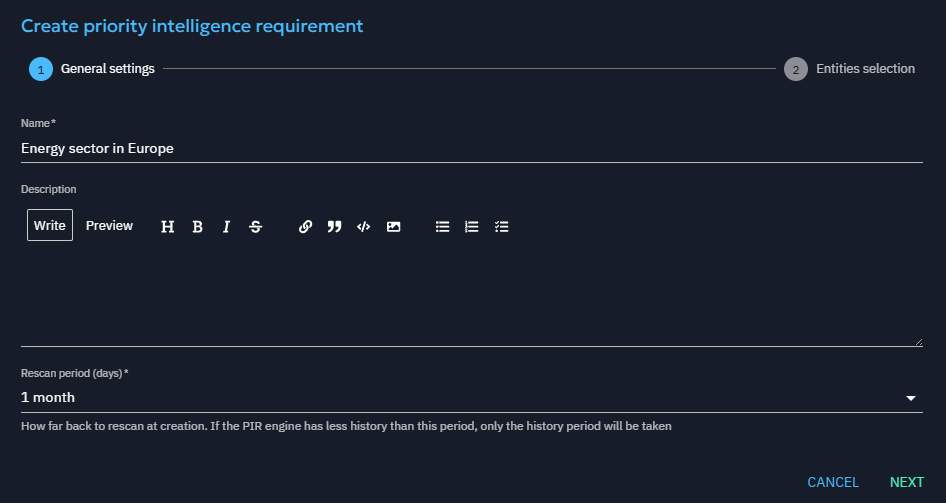
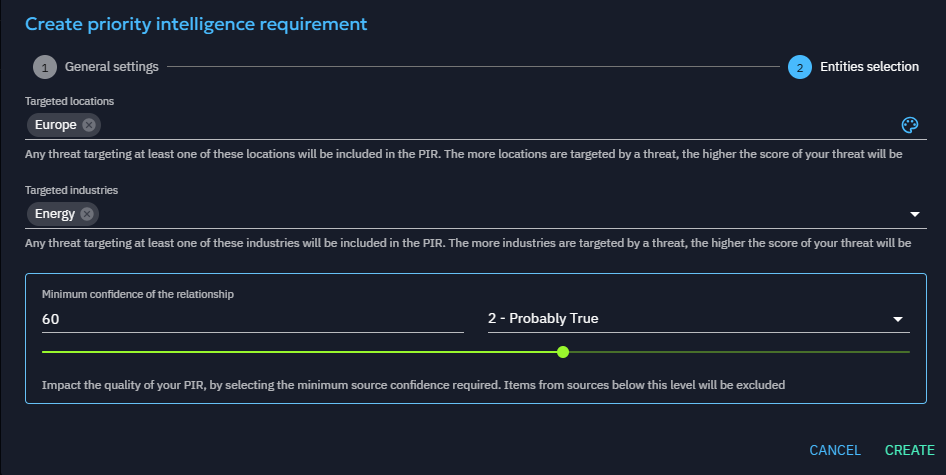
Now, let’s see how this information helped in determining your PIR content.
Stream events are analyzed periodically to update the PIR entities of interest. If a rescan period is specified, OpenCTI processes the stream starting from the corresponding rescan date (e.g., one month prior to the current date in our example).
For each event, the source entity is added to the PIR if it represents the creation of a relationship that:
- Matches one of the PIR criteria (e.g., the relationship indicates that entity X targets the Energy sector or Europe), and
- Satisfies the PIR filters (e.g., the relationship has a confidence score of 60 or higher).
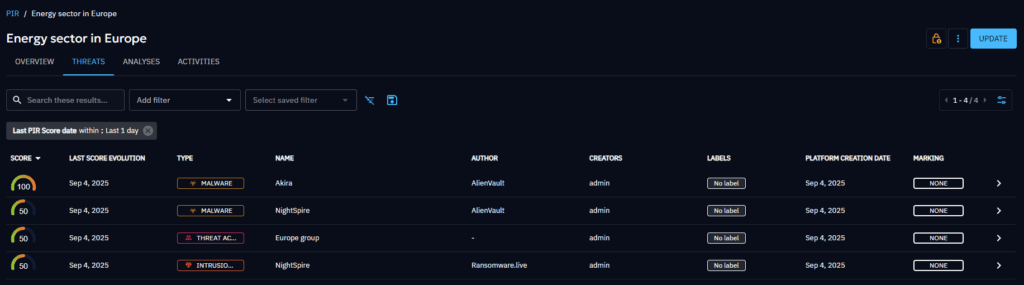
A PIR score is associated with each entity of interest, indicating the percentage of criteria it matches. With our example, a malware targeting the Energy sector but not Europe will have a score of 50, a malware targeting both will have a score of 100.
If a relationship respecting the filters and criteria is deleted, the score decreases, or the entity is removed from the PIR if there is no other relationship maintaining it in the PIR.
Note: Entities matching a criteria because of an event happening before the beginning of the rescan will not be taken into account! For instance, if a malware has a relationship with Energy that was created 3 months ago, and a PIR is created with a rescan period of 1 month, the malware will not be added to the PIR unless the relationship is updated (and a new event concerning it shows in the stream).
PIR overview: a visual insight of your PIR content
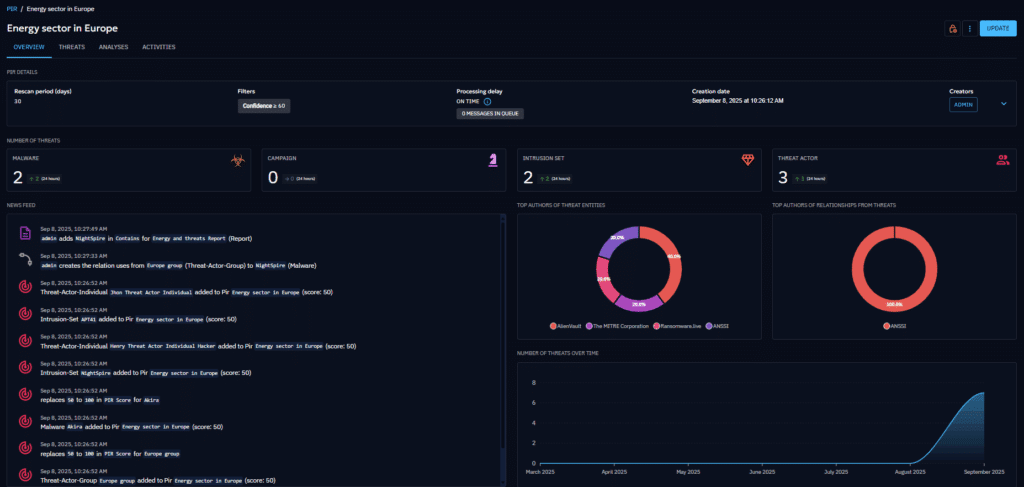
Continuing using our example, let’s see the details available for a newly created PIR. In the ‘Overview’ tab, you have access to visual insights of your PIR content.
The PIR details gather the PIR definition information: rescan period, filters, criteria, creation date, creators, description, and processing delay. The processing delay is the difference between the last stream event and the last event processed by the PIR. It indicates the late compared to the stream. The number of messages in the queue shows the tasks not yet processed.
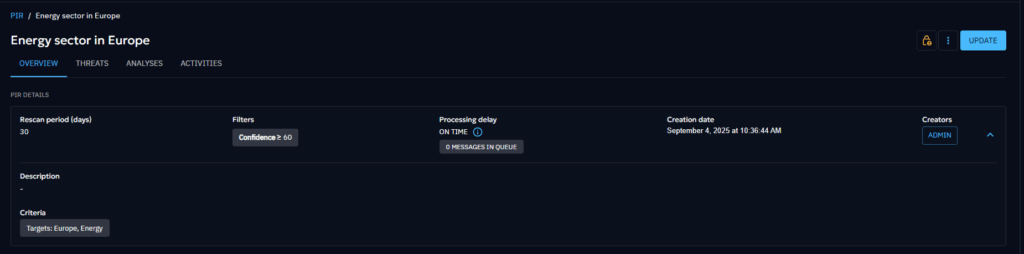
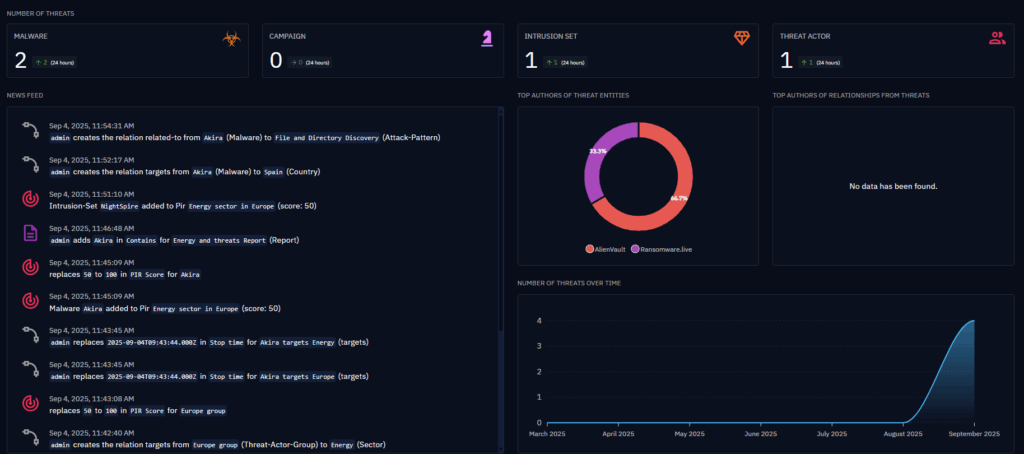
The overview includes useful widgets that provide a visual summary of the PIR and highlight key areas of interest:
- Number of threats (i.e. number of entities in the PIR) by entity type.
- News feed showing the last historic events of interest give an insight into the last important news in your context (see the ‘PIR Activities’ section for more information on the events displayed there).
- Top authors of threat entities
- Top authors of relationships from threats to show relationships that have caused a marking of entities of interest (i.e. the ‘targets Energy/Europe’ relationships in our example). It provides insight of the top sources for your PIR
- Number of threats over time showing entities marked as of interest over time
PIR threats: the entities to focus on
In the Threats tab, the list of entities of interest for this PIR is displayed. You can order and filter entities by score or by the date of their last change to highlight the most relevant ones. Hovering over a score shows why the entity is included, supporting effective prioritizing of intelligence across your threat landscape.
PIR Analyses: the containers mentioning entities of interest
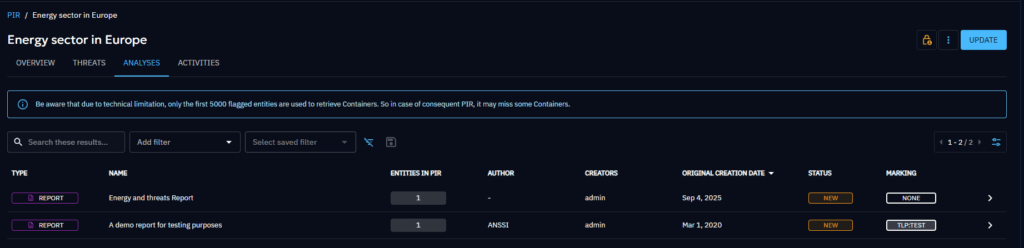
The Analyses tab gathers the containers that include a relevant threat of interest or an entity in the criteria of the PIR, allowing you to view the most contextually relevant content.
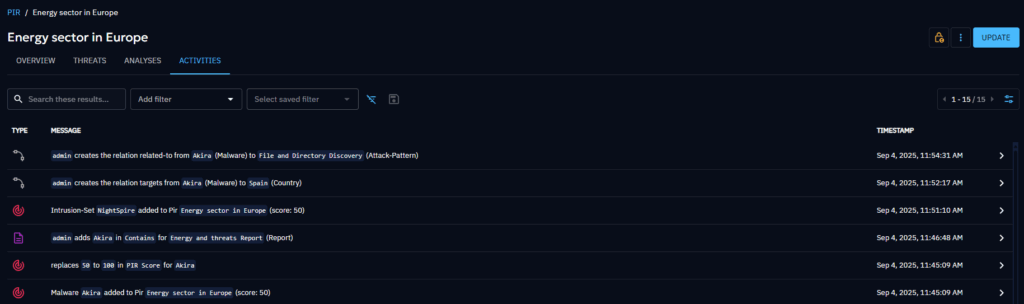
PIR Activities: crucial historical events
The Activities tab lists the events of interest for the PIR:
- Addition or removal of an entity in the PIR (meaning a new entity is detected as of interest, or an entity is no more of interest), or change in the PIR score of a threat (increase of score because it targets a new criteria, or decrease of score because it targets no more a criteria).
- Creation or deletion of a relationship involving a threat of interest.
- Addition or removal of a threat of interest in a container.
It provides insight into recent activities within your context. Enabling you to take action on any new developments related to a critical threat.
Please note: PIR functionality is available exclusively in our Enterprise Edition. Access requires specific user capabilities – one for viewing PIRs and another for creating, updating, and deleting them. Contact your administrator to ensure you have the necessary permissions.
Conclusion
Priority Intelligence Requirements (PIRs) in OpenCTI empower security teams to focus on the most critical threats by prioritizing intelligence effectively. By gathering, tracking, and analyzing relevant data, teams can turn overwhelming feeds into actionable insights and ensure important threats are never overlooked. They help direct resources toward the most pertinent information, enabling more effective analysis, decision-making, and risk assessment. Ultimately, establishing and using PIRs effectively turns complexity and massive datasets into clarity and relevance. It helps your organization stay ahead of what’s most important and enabling faster, smarter, and more confident decisions.
Enjoy and feel free to ask any questions about it on our Slack community channel !
Read more
Explore related topics and insights