OpenCTI & HarfangLab: a connector to enrich CTI data and optimize incident response

Frédéric Basler
Associate Software Engineer
-
 Copied!
 -
Copied!
-
Copied!



HarfangLab Connector: a technical approach for enhanced cybersecurity
In the demanding universe of cybersecurity, every moment counts. This implies not only the need to react swiftly in the face of evolving threats, but also to have effective tools that streamline investigations and response efforts.
Explore how integrating a connector between HarfangLab and OpenCTI speeds up threat detection, promotes collaboration among teams, and strengthens data protection while improving the correlation of sensitive information.
Benefits of the OpenCTI x HarfangLab Stream Connector
The new connector HarfangLab x OpenCTI automates the flow of data between OpenCTI and HarfangLab, enhancing efficiency and reducing the need for manual intervention.
Here are four benefits:
- Enhanced Detection Capabilities: The connector strengthens HarfangLab’s threat detection by leveraging an extensive repository of high-quality indicators from OpenCTI. This collaboration ensures access to a comprehensive and varied set of indicators, enhancing the accuracy of threat identification and reducing the risk of false positives.
- Speed and Automation: The HarfangLab EDR connector facilitates the automatic and real-time transmission of indicators from OpenCTI. This streamlines the detection process, ensuring that critical threat intelligence is rapidly communicated and acted upon.
- Intelligence-Led Response: Alerts triggered in OpenCTI leverage the complete threat knowledge base of OpenCTI, providing analysts with the necessary context to effectively evaluate threats. Analysts also have access to the full spectrum of OpenCTI functionalities, including case management and automation rules, which aids in efficient incident response.
- Practicality and Integration: This integration offers a seamless experience for data exchange between OpenCTI and HarfangLab, significantly reducing the manual workload for analysts. This collaboration frees up valuable time for security experts to focus on more critical tasks.
In summary, the creation of an OpenCTI x HarfangLab Stream connector enhances the organization’s security posture by enabling faster and more precise threat detection, effective collaboration between teams, and process automation for a more efficient response to security incidents.
Decryption of the OpenCTI x HarfangLab Stream Connector
What is a Stream Connector?
Connectors are the cornerstone of the OpenCTI platform. There are 5 different types of them but we will focus on the Stream connector, designed to facilitate real-time data transfer between OpenCTI and other systems or platforms.
Connectors are developed in Python due to Python’s popularity and simplicity, making them particularly accessible for community uptake, especially among cybersecurity analysts.
A Stream Connector integrates into the platform’s CTI data flow, where it operates continuously to process incoming events. This dynamic and filterable Stream allows real-time consumption of relevant data from OpenCTI, such as indicators of compromise (IoCs) and detection rules in YARA, SIGMA, and STIX formats. This information is then routed to third-party platforms such as SIEMs, XDRs, or EDRs, enhancing their ability to detect and respond to emerging threats.
How does the OpenCTI x HarfangLab Stream Connector work?
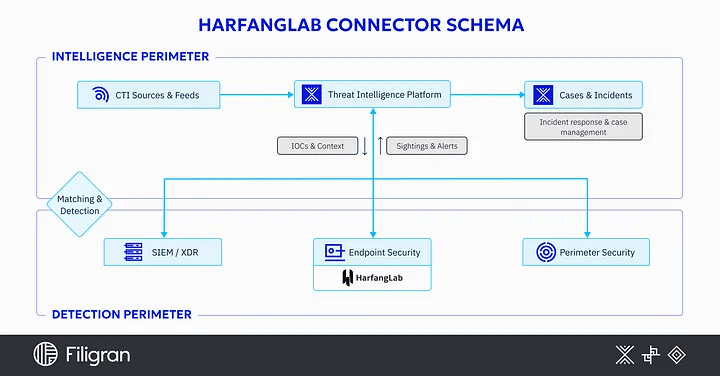
In this section, we will explore in detail the different capabilities offered by this connector. Each point details an essential functionality that will help better understand how the HarfangLab Stream connector works.
- Creation of a Custom Stream: Configuring a custom Stream on OpenCTI allows listening to the platform’s “general” Stream while applying specific filters to more precisely target the relevant data to be processed.
- Connector Configuration: The connector is configured with environment variables available to the user, offering an optimal experience between HarfangLab and OpenCTI. Refer to the README file for more details: here.
- Event and Enrichment: Once the custom Stream is created and the connector is launched, it monitors all events related to the Stream and directly enriches the HarfangLab platform based on Indicators of Compromise defined by the filters.
- Data Collection: When the “import_security_events_as_incidents” variable is set to “true,” the connector starts collecting essential data generated by HarfangLab, such as security alerts, incident events, and information on detected threats.
- Data Transformation: The collected data is then transformed and prepared for transmission to OpenCTI. This includes converting the data to the STIX 2.1 serialization format, filtering out irrelevant information, and enriching the data with additional metadata as needed, as well as any related relationships between different entities.
- Real-time Transfer: The prepared data is transmitted in real-time to OpenCTI via the Stream connector, ensuring that the information is available for analysis and correlation as soon as it is generated by HarfangLab.
- Receipt and Processing by OpenCTI: Once the data is received, OpenCTI integrates it into its system and processes it according to pre-established management rules, which involves creating incidents for each alert identified by HarfangLab as well as responding to incidents. The user will always have the option to correlate with other threat data or enrich with additional intelligence.
- Usage Limitation:
- Filters are recommended at the custom Stream level in OpenCTI, including criteria such as entity type, detection, revocation, and pattern type (Yara / Sigma / Stix).
- The user must not make manual modifications to the indicators or observables listed in the from_OpenCTI lists.
- It should be noted that some sigma rules may be incompatible with the HarfangLab API, resulting in a “Deserialization errors” (invalid field) error.
- For Yara and Sigma rules, other options are automatically handled by HarfangLab via the rules themselves, such as operating system, MITRE tactics, and MITRE techniques.
- Regarding IoCs, HarfangLab only supports certain types, including: domain name, hostname, ipv4-addr, ipv6-addr, URL, hash (SHA256, MD5, SHA-1, SHA-512), and artifact.
In summary, the OpenCTI x HarfangLab Stream connector facilitates continuous and bidirectional data exchange between HarfangLab and OpenCTI, allowing for hierarchical organization of information for effective analysis and agile response to security threats.
Use Case: Information Flow between OpenCTI and HarfangLab
This use case study will reveal how data flows between OpenCTI and HarfangLab, forming an effective core in information exchange.
Prerequisites:
Before presenting this use case, a few prerequisites are necessary:
Installing the HarfangLab Agent:
- The user must follow the documentation provided by HarfangLab to install and configure the agent correctly on the target hosts.
- Without the agent, importing alerts and threats into OpenCTI will not be functional because without detection in HarfangLab, there will be no creation on the OpenCTI side.
Creation and Configuration of a Custom Data Stream:
In OpenCTI – Data / Data sharing / Live streams:
- Create a new live stream using the “+” button.
- Define the name and add these filters:
- Revoked = No (this filter ensures that only active indicators are considered).
- Is detected = Yes (if you want to control the indicators sent to HarfangLab, by default when creating an indicator, the detection is set to false).
- Entity type = Indicator (only events on indicators are considered).
- Pattern type = stix or sigma or yara (it is important to specify these 3 types of patterns).
Once the live stream is created and configured, you will have a unique identifier for the connector.
You will need to place this unique identifier in the environment variable named “LIVE_STREAM_ID”. This procedure is crucial to properly link the connector to the custom Stream with the correct filters.
Then, you just have to start it and have the status “started”.
Configuration of Environment Variables :
opencti:
  url: 'http://localhost:8080'
  token: 'ChangeMe'

connector:
  id: 'ChangeMe'
  type: 'STREAM'
  live_stream_id: 'ChangeMe' # ID of the live stream created in the OpenCTI UI
  live_stream_listen_delete: true
  live_stream_no_dependencies: false # Necessary to detect observables in the stream
  name: 'HarfangLab'
  scope: 'harfanglab' # Reserved:
  confidence_level: 80 # From 0 (Unknown) to 100 (Fully trusted)
  log_level: 'info'

harfanglab:
  url: 'ChangeMe' # The URL of the Harfang Lab Server
  ssl_verify: true
  token: 'ChangeMe' # Token for bearer auth (if set, will ignore basic auth params)
  login: 'ChangeMe' # Login for basic auth
  password: 'ChangeMe' # Password for basic auth
  source_list_name: 'from_OpenCTI'
  remove_indicator: true
  rule_maturity: 'stable' # Available : stable or testing
 import_security_events_as_incidents: true
 import_threats_as_case_incidents: true # If true then "import_security_events_as_incidents" must be true
 import_security_events_filters_by_status: 'new, investigating' # Filters available : new, investigating, false_positive, closed
 import_filters_by_alert_type: 'yara, sigma, ioc' # Filters available : yara, sigma, ioc
 default_markings: 'TLP:CLEAR' # Markings available : TLP:CLEAR - TLP:GREEN - TLP:AMBER - TLP:RED
 default_score: 50
For more information on individual environment variables, we invite you to consult the corresponding README here.
Additional Resources:
- HarfangLab Connector GitHub Link: HarfangLab Connector
- How to Deploy Connectors: OpenCTI Documentation
- What is Data Streaming: OpenCTI Reference
Use Case Steps
1. Sending Yara, Sigma Rules, and IOCs from OpenCTI to HarfangLab:
- Once the stream is configured, OpenCTI regularly sends YARA rules, Sigma rules, and Indicators of Compromise (IOCs) to HarfangLab via the custom data stream.
- One detail, however, for IOC of type stix, the connector will send the transformed data to match HarfangLab’s data format.
- Let’s take an example:
Let’s create a new URL with a Stix pattern, and for the pattern:
[url:value = 'https://threatexample.com']Here’s what happens on the previously configured stream, and here are the different types of events that exist, when creating, updating, deleting an indicator:
— Event “CREATE”:

— Event “UPDATE”:

— Event “DELETE”:

- As you can see, it is thanks to these events triggered on the stream and the information retrieved that we can, with the connector, process the information and transfer it to HarfangLab, whether for creation, update, or deletion.
- Also note the importance of properly configuring the stream filters, as the connector will not process all types of patterns existing on the OpenCTI platform, only valid pattern types at HarfangLab will be processed (Yara / Sigma / STIX — (for IOC)).
- If you do not want to completely remove the IOCs at the HarfangLab level, the “remove_indicator” environment variable set to False allows you to disable the IOC instead of deleting it.
2. Once the Connector is Successfully Started:
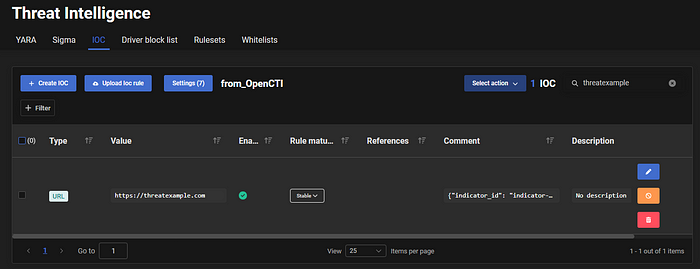
- At the launch of the connector, it will automatically create a “from_OpenCTI” list at HarfangLab in the “Threat Intelligence” section for Yara rules, Sigma rules, and IOCs. If these lists already exist, then the connector will automatically retrieve the identifiers of these lists and ingest the data into them:

3. Receiving Data by the HarfangLab EDR Platform:
- Rules and Stix indicators from OpenCTI are integrated into the HarfangLab EDR platform:
- It is strongly discouraged to directly create, modify, delete directly in the “from_OpenCTI” lists, as this may generate errors that can cause, in the worst case, the connector to stop.
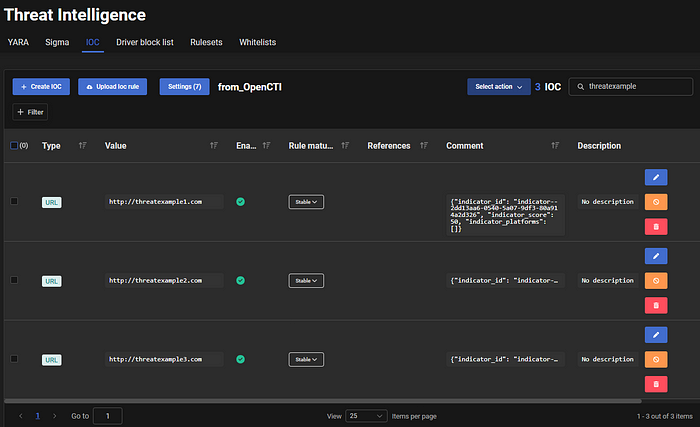
- It should also be noted that the connector can handle Stix indicators, but also observables related to this indicator. To do this, in the “comment” section, we have indispensable metadata to find the information of the main indicator (given that in HarfangLab it is not possible to differentiate an indicator from an observable). However, if you decide to delete the main indicator, all observables related to it will also be correctly deleted at the HarfangLab level.
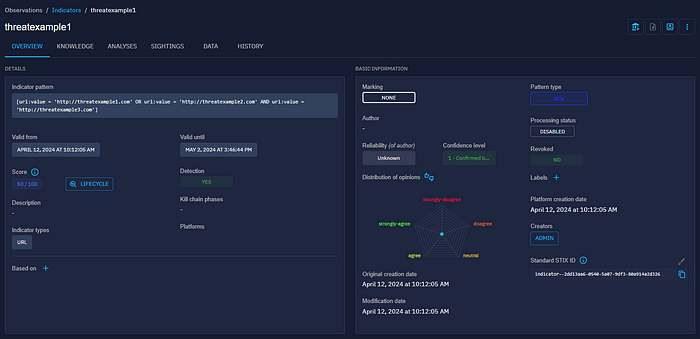
- There is also a small particularity, indeed, the connector will also handle “complex” Stix indicators with AND and OR. However, there will be no differentiation possible at the HarfangLab level, they will be created as IOCs.
- Example Stix Indicator with AND and OR:
[url:value = 'http://threatexample1.com' OR url:value = 'http://threatexample2.com' AND url:value = 'http://threatexample3.com']- At the OpenCTI level:
- At the HarfangLab level: We have the three IOCs created, and in the “comment” section, we find the OpenCTI STIX standard identifier as indicator_ID.
4. Security Event Detection and Threat Detection:
When the HarfangLab agent detects suspicious activity matching the rules and IOCs, it generates a “Security event” for each of these detections, and also automatically raises a threat for its detections.
Incident Creation on OpenCTI:
- The connector will automatically generate incidents on the OpenCTI platform for each “Security event” detected by HarfangLab.
- Additionally, it will assign a unique external reference to each “Security event”.
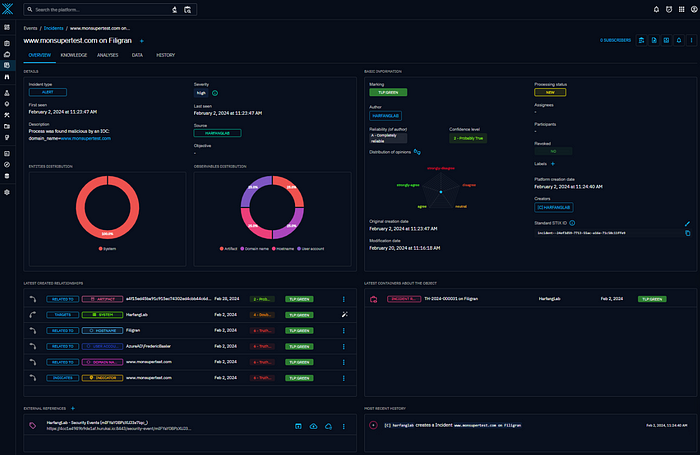
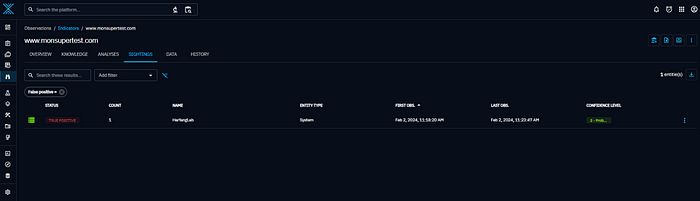
- Each time the connector creates a new indicator on OpenCTI, a sighting will be automatically generated, indicating the number of occurrences linked to the number of detected “Security events”.
Incident Response Creation on OpenCTI:
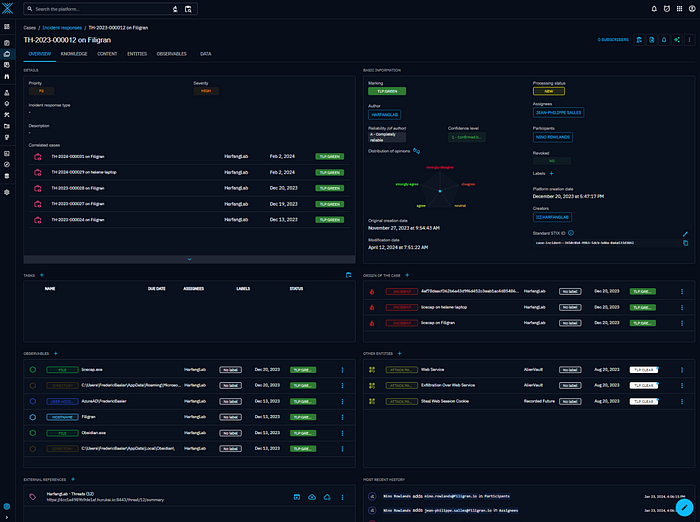
- For each identified threat, incident responses are automatically generated on OpenCTI. These incident responses gather all relevant information about the detected threat, including details about the host concerned as well as all associated “Security events”.
- Here is an example of incident responses:
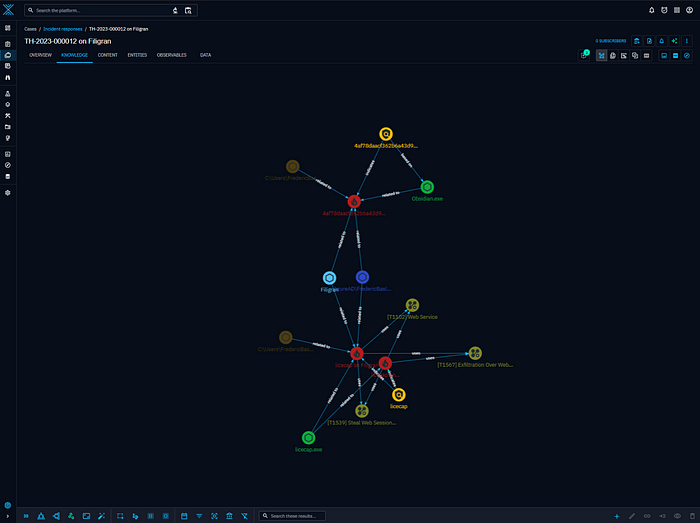
- We can also benefit from a more intuitive visual representation at the knowledge level.
About HarfangLab
HarfangLab EDR, Advanced Protection Against Cyber Attacks

HarfangLab EDR (Endpoint Detection and Response) stands out as an advanced solution in the field of cybersecurity, offering proactive and reactive protection against cyberattacks targeting computers and servers. This platform is CSPN certified by ANSSI (National Cybersecurity Agency of France), thus attesting to its reliability and compliance with the highest security standards.
HarfangLab EDR offers various complementary detection engines: by signature, IOC, behavioral, or even an engine specifically developed to counter ransomware, as well as an AI-powered engine. This combination of technologies, installed directly in deployed agents, allows for effective detection close to threats while minimizing false positives.
In addition to its performance in detection and response, and its ultra-lightweight agents, HarfangLab EDR offers features for isomorphic operation in public, private, and hybrid cloud environments, for all operating systems.
Let us know what you think of it in our Community Slack channel!
Read more
Explore related topics and insights