OpenCTI (6.0.10+) in Air gap/diode environments

Julien Richard
CTO and co-founder
-
 Copied!
 -
Copied!
-
Copied!



Cyber Threat Intelligence is made to be used everywhere, and this word not only means “in every country in the world”. It also means in “connected” or “disconnected” networks. Data ingested in OpenCTI can be quite different depending on the organizations usage and so the security associated to it. When the security is a priority, it could be interesting to have a deployment in an “air gap” environment.
Air gap
Let’s start with a simple definition of this word.
An air gap, air wall, air gapping or disconnected network is a network security measure employed on one or more computers to ensure that a secure computer network is physically isolated from unsecured networks, such as the public Internet or an unsecured local area network. https://en.wikipedia.org/wiki/Air_gap_(networking)
Based on this definition it’s easy to understand that this limitation will require to adapt the way the platform is deployed and managed. For now this limitation was not natively addressed by the platform and required extra effort from the organizations. As a mission of OpenCTI is to be deployed everywhere in a simple way, we decide to work on this subject to publish a native way of achieving this “air gap” deployment.
Architecture principle
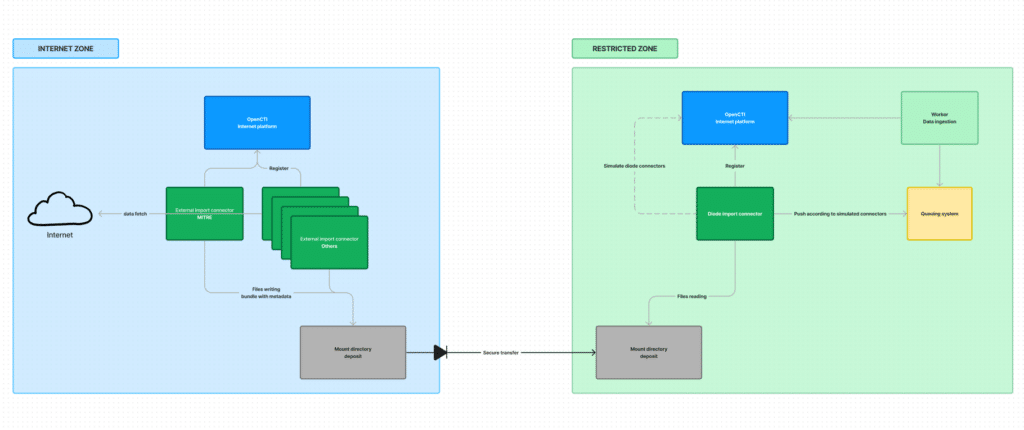
This article aims to describe a simple air gap infrastructure between two platforms. In this architecture we will have one platform connected to internet aka “internet zone” and a platform isolated aka “restricted zone”.
In the “internet zone” the platform will be responsible for fetching the CTI information on internet sources (#external connectors to files). No data will be written in this platform, only the connectors management.
In the “restricted zone” the platform will be responsible to ingest the data fetched from the “internet zone” (#diode-import connector to OpenCTI) and make it available in the OpenCTI user interface.
Data will be transferred from the “internet zone” to the “restricted zone” through files transfer in a unidirectional way (diode).
External connectors to files
To achieve this we had to modify the python framework to let external connectors writing the data to files if needed. Currently data is sent to the OpenCTI RabbitMQ only but with this new option, it will be possible to write specific bundles to files along with sending to the queue if needed.
Supported connectors
To be supported in this mode the connector needs to be of type “external-import” and build STIX bundle for ingestion instead of using the Api to ingest data. The majority of connectors of this type must be compatible but if you find one you want to use and not supported, don’t hesitate to join the slack community and create a Github ticket.
Except the diode-import connector that will be used to reimport the data
Connector configuration
For compatible connector some new options are available under the connector section. To make administrator life easier its also possible to setup a maximum retention days to prevent files explosion in this directory.
connector:
    send_to_queue: True
    send_to_directory: True
    send_to_directory_path: "/air_gap"
    send_to_directory_retention: 7
Data file format
Files exported to this directory are not only STIX bundle. In order to be able to simulate the original connectors behaviors and users the file must contains more information than only the STIX information.
{
 "bundle_type": "DIRECTORY_BUNDLE",
 "applicant_id": "<ORIGINAL_USER_ID>",
 "connector": { Original connector information },
 "entities_types": "<LIST_CONTEXT_ENTITY_TYPES>",
 "bundle": { STIX bundle },
 "update": "<UPDATE_MODE>"
}
Files transfer
The files transfer is not directly managed by OpenCTI between the two zones. We need to use a dedicated tool to do it. A lot of solutions exists, some Linux native like rsync or specific licensed software’s (like Axway MFT).
Diode-import connector to OpenCTI
Next step after the data files transfer is to integrate the data in the “restricted zone” OpenCTI platform. To do this the only connector that needs to be deployed is the diode-import connector.
This connector has a really specific behavior to reintegrate the data. As multiple connectors can send the data through files, we need to reconstruct the initial connectors in the restricted OpenCTI and allocate all the messages in the corresponding queues to simulate the original activity. As OpenCTI also used a specific user to integrate the data it will be required to map the “internal zone user” to the “restricted zone user” to create the correct modification history.
diode_bundle_import:
  get_from_directory_path: '/restricted_zone'
  get_from_directory_retention: 7
  applicant_mappings: "<PUBLIC_USER>:<RESTRICTED_USER>,..."
Global picture
To have a global picture of the system, don’t hesitate to open this Figma representation.
Conclusion
The introduction of a native way to handle air gap environment will help organizations to secure their CTI data without developing/creating lot of specific integrations.
Of course this first implementation will be improved in the future and all comments you can have are welcomed!
If you have any question, request, comment or feedback to share with us, don’t hesitate to join us on Slack!
Read more
Explore related topics and insights