Introducing decay rules implementation for Indicators in OpenCTI


Angélique Jard
Staff Software Engineer

Souad Hadjiat
Staff Software Engineer
-
 Copied!
 -
 Copied!
 -
 Copied!
Cyber Threat Intelligence is made to be used. To be useful, it must be relevant and on time. It is why managing the lifecycle of Indicators of Compromise (IoC) is so important in cybersecurity. But IoCs are often received by thousands. So, how managing them all to make them relevant and a time sensitive context?
To answer this problem, we have introduced in the Score Decay algorithm into OpenCTI 6.0 to help managing your IoCs lifecycle!
Indicator lifecycle changes with the new Decay algorithm
IoCs indicates that everything matching their pattern is “malicious”, or at least relevant regarding a threat. This maliciousness/relevancy is represented by the IoC’s “score” and the IoC’s “valid_until” values. Prior to 6.0, the Indicator’s score in OpenCTI could only change based on new information (manual update, new data from feed, playbook) but not over time. It was an On/Off model that could not represent IoC’s relevancy evolution over time.
With decay rules enabled, Indicators can now see their score decreases over time.
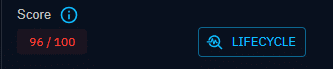
On the Indicator overview, a new button is now present next to score called “Lifecycle”.
When opening the Indicator lifecycle view, it shows the curve representing the IoC lifecycle. A table list all the relevant scores that are being monitored to be able to react on them. The last of these scores is the one making the IoC revoked because of irrelevancy.
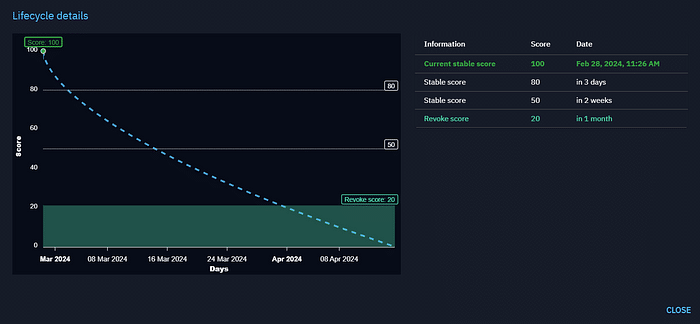
The curve is displayed for context, but the Indicator score that is visible on the Indicator overview and stored in the database will take score values in the table. When a stable score’s time is reached, the platform updates the score of the IoC and this update can be react upon the same way it is when the score is updated manually on the UI (in streams, in playbook, in notifiers).
How does the OpenCTI platform select a decay rule for an Indicator ?
The CTI platform has several decay rules configured by default, and users with Settings access can configure new ones as explained in the Administration section of this article.
The decay rule selection is based on the “main observable type” of Indicator and a priority system.
When a new Indicator is created, the Decay algorithm:
- Search for decay rules based on the main observable type of the Indicator (for example: Domain name)
- Select the decay rule with the highest order
- If no rule exists on the main observable type, take the decay rule that matches all observable types with the highest priority.
The decay rule is selected when the Indicator is created. It means that if an Indicator is created with a decay rule, then this decay rule parameters are modified afterwards, the new parameters are not applied on the Indicator. Only new Indicators that match the rule will have the new parameters.
It also means that Indicators that exists on the platform before migrating to OpenCTI 6.0 will not have a backward computation of decay rule. Please note that when any Indicator reaches the “valid_until” date, Indicators are still revoked. Score decrease and revoke score with decay rule work all together with the revoke mechanism.
This design of Indicator decay rule engine is made for performance reasons, given that an OpenCTI platform can have a millions of existing Indicators.
What happens if the score is updated by UI or connectors ?
You might see some Indicator lifecycle curves that don’t start from the Indicator score at creation. The reason is that when the score is updated manually in the UI or by from connectors/feeds, this new score is taken as the starting score for decay computation, and stable score dates and revoke dates are computed again. To maintain understanding of the full Indicator lifecycle, scores that this Indicator may had before this update are kept and displayed in the table.
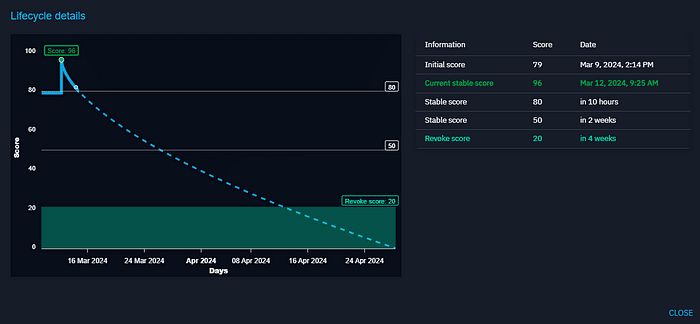
For example in this screenshot, the Indicator’s score at creation was 79 on March 9, 2024, but for some reason, it was updated by a user to 96 on March 12, 2024. As a result, the dates for next stable score and revoke score have been computed again, starting from March 12, 2024.
Administration of decay algorithm and rules
For administrators, decay rules can be configured in “Settings > Customization > Decay rules”.
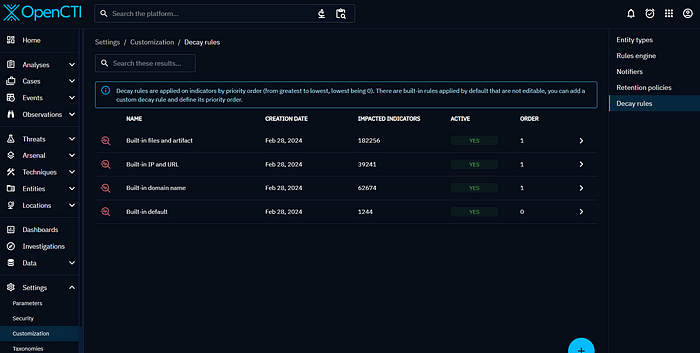
We provide four built-in decay rules that are applied by default.
The last rule, with the lowest priority is the rule that is applied when no other rule matches.
The built-in rules are special: it is not possible to change their parameters, disable or delete them. Their priority orders are set to 0 and 1. If you want to apply other rules, you can simply create them with your own parameters and set a higher priority order (at least 2).
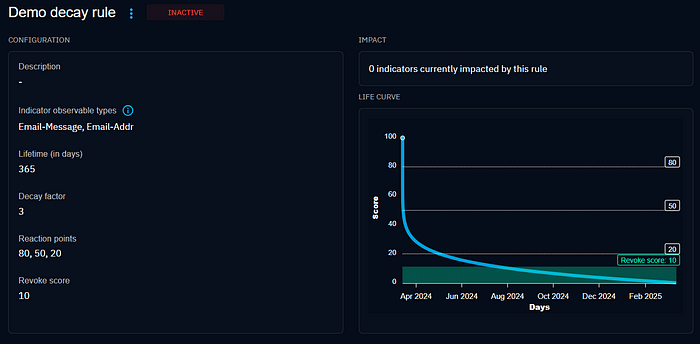
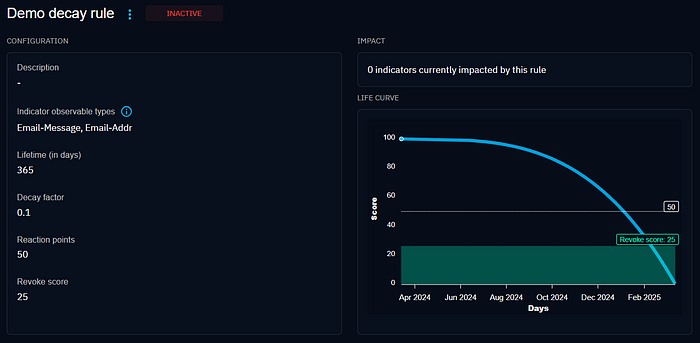
When creating a new rule, the parameters are:
- Main observable type: Indicators that have one of the observable types in this list at creation will match the rule. An empty list means that the rule will matches any Indicator.
- Lifetime (in days): this is the duration in days that the score will take to reach zero following the curve algorithm.
- Decay factor: this parameter defines the shape of the decay algorithm curve. A value below 0.33 indicates a slow decrease at the beginning, while a value above 0.33 indicates a faster decrease.
- Reaction point: it’s the score that will trigger an update of the Indicator score in the database to be reacted upon.
- Revoke score: it’s the score that will trigger a revocation of the Indicator. The indicator is revoked at the first event: either when reaching that revoke score or when the valid until date is reached.
- Order: this parameter represents the priority order. If the Indicator main observable matches several rules, the rule with the highest priority is taken. When two rules match with the same priority, one of them is selected randomly.
Next steps for the Decay feature
In the future, we want to upgrade further the Decay feature! For example, it could be a great idea to take into account in the score’s evolution when an sighting is added to an Indicator. It could also be great to define more precise filters, based on other properties like markings.
Let us know what you think of it in our Community Slack channel!
Reference documentation:
Usage : https://docs.opencti.io/latest/usage/indicators-lifecycle
Administration : https://docs.opencti.io/latest/administration/decay-rules/
Managers configuration : https://docs.opencti.io/latest/deployment/configuration/#engines-schedules-and-managers
Read more
Explore related topics and insights