Introducing advanced filtering possibilities in OpenCTI

Cathia Archidoit
Associate Software Engineer
-
 Copied!
 -
 Copied!
 -
 Copied!
CTI databases are usually vast and made of complex, inter-dependent objects ingested from various sources. In this challenging context, cyber analysts need to target precisely and easily the data they want. As such, filtering capabilities are at the cornerstone of any efficient CTI tool. OpenCTI offers powerful features around data exploration, investigation and pivoting, but its filtering capabilities were limited, and significant efforts were necessary to take them to the next level.
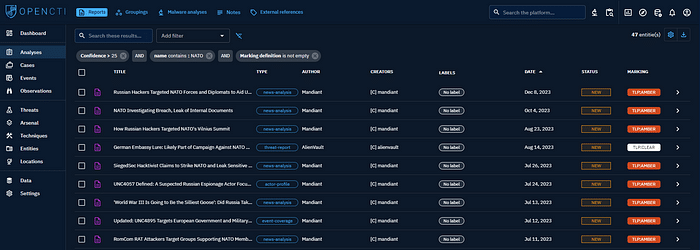
Starting from OpenCTI 5.12, you are now able to build complex filters, with the introduction of new operators (like ‘is not empty’ or ‘starts with’), the possibility to switch the Boolean modes (and, or), and soon the ability to imbricate filters on almost any existing attribute.

A needed improvement
Before OpenCTI 5.12, the filters capabilities were restricted.
- you could only add filters on a fixed list of entities attributes (like their author or name)
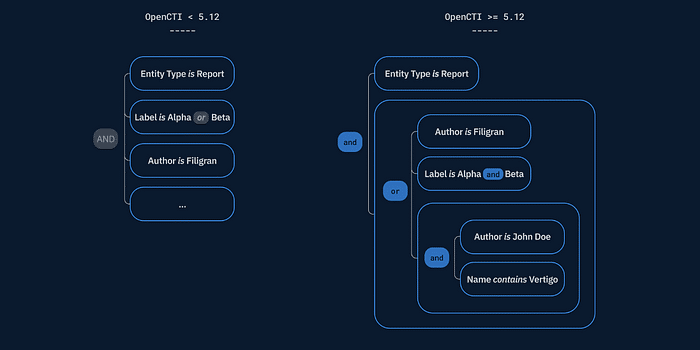
- the modes between values or filters were static (’and’ between filters, ‘or’ between the values of the same filter)
- the available operators were limited to equality testing and numerical comparison

Due to these limitations, the following filters were simply impossible to express:
- (Report Type = Threat Report) OR (Label = Malware)
- (Entity Type = Report) AND (Marking is empty)
- Name contains ‘blackmail’
- ‘Participants’ is empty
Moreover, some filters were inter-dependant but the interface and the format didn’t clearly show this dependancy. This was the case for some widgets filters combinations (relationship type and related entity).
Finally, the underlying implementation gave not enough room for improvement. Not at the scale we wanted to see this feature grow.
The new filtering possibilities in OpenCTI 5.12
And/or modes switching
Modes are the logical links applied between filters and values. Using ‘and’ means that an object must match all the values defined in the filter to match the whole filter. With ‘or’ only one value is necessary.

If more than one filter is set, a mode must also be applied between the filters: with ‘and’ only objects that match every filters will be returned, with ‘or’ objects matching at least one filter will be returned.
In OpenCTI 5.12, you can now change all the modes (and/or) by clicking on it directly. It enables to combine the filters in different ways.


More operators
Operators are defined within each filter and represent how values in the objects are compared to the filter values (for instance, the values should be ‘greater’ than the filter value).
OpenCTI 5.12 gives you access to more operators. For instance, you can check if an attribute as a value or not, test if a string starts with a given word or contains a certain phrase.
The available operators are now:
- for any attribute: equal, not equal, empty, not empty,
- for dates and numerical values: greater than, greater than or equals, lower than, lower than or equals,
- for string: contains, not contains, starts with, not starts with, ends with, not ends with.

Inter-dependant filters
The interface has been designed to enable the display and selection of inter-dependant filters, such as the new ‘in regards of’ filter that targets all the entities having a relationship of a certain type and with a certain entity.
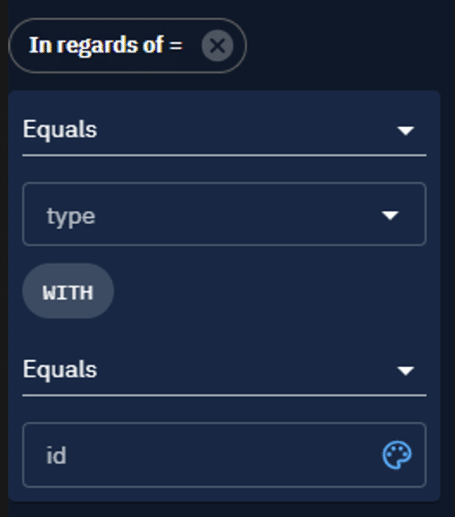
For instance, ‘in regards of relationship type = located-at, with entity = France’, returns all the entities located in France. Refer to the documentation for more information about this new filter.

For any further information and more details, please refer to the documentation: Filters knowledge — OpenCTI Documentation.
Next steps
We will continue to improve the filtering possibilities in the months to come, with important and long-awaited features.
Filter lists on any attribute in the UI
In the 5.12 API, you are able to filter the list of entities on any attribute you want if it exists in the platform: the list of the available fields on which you can filter is no more restricted. For instance, if an entity has a field modified_date it is now possible to create a filter on this date.
This functionality will be added in the platform User Interface in an upcoming release.
Note that this is only the case for lists filtering. The filters you can choose in streams, triggers, feeds, taxii collections and playbooks are restricted.
Complex filters imbrication in the UI
It will also be possible to imbricate filters at different levels and create really complex filtering schemas directly in the User Interface.
Technical insights
For those interested in how we did the job on the technical side, here are some details.
A new recursive format
The old format was a simple list of filters with a key (like ‘Entity Type’) and one or more values (like ‘Report’ or ‘Malware’). The modes were implicit: ‘or’ between the filters and ‘and’ between values in a given filter.
In the new format, the filters are structured in recursive filter groups, each group containing filters or nested filter groups. Boolean modes and operators are explicitly set in the filters and groups and can vary, allowing for any combination.
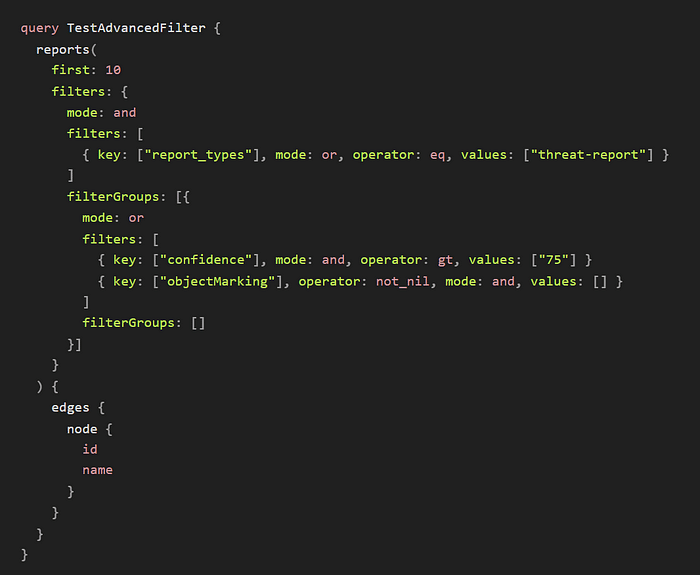
A new logic engine
The new filter format opens a lot of possibilities and combinations that we process in a generic logic engine. It might craft elastic queries on the fly, or test filters directly against the Stix objects in the OpenCTI event stream.
Breaking changes in the API
As you could expect, these changes were not light. Filters are everywhere in OpenCTI, from the dashboards and knowledge views to Taxii feeds and notification triggers.
We updated the API to make use of this new format, which naturally impacted the OpenCTI python client and the various connectors.
By extension, these breaking changes also impact any scripts or code that you might have written to work with OpenCTI. The migration process for 5.12 is documented and straightforward.
An ongoing effort
OpenCTI 5.12 comes with significant improvements in terms of data filtering, with a brand new filter format that is versatile and powerful, for both daily activities and complex tasks.
You can expect a lot of improvements in the upcoming releases as we maintain our effort on the filtering capabilities in OpenCTI!
We hope this article has helped you understand how you can take the most out of OpenCTI new advanced filtering. If you have any question, comment or feedback don’t hesitate to join us on Slack!
Read more
Explore related topics and insights