How to set up your EDR/SIEM collector with OpenAEV

Antoine Mazeas
Senior Software Engineer
-
 Copied!
 -
Copied!
-
Copied!



When maintaining critical computer systems, we are inevitably tasked with keeping them in running order and secure from attacks and intrusions. With OpenAEV, we can simulate a plethora of attack scenarios that could compromise these systems.
However, the story does not end with simply executing a simulated malware: the most important part is knowing how the systems coped with the attack to have an up-to-date understanding of the potential risks and exposure. Typically, Security Platforms such as EDRs and SIEMs will detect and/or prevent these attacks, and then create actionable reports with details of what happened and what actions were taken.
OpenAEV is designed to employ modules called Collectors to interface with these solutions and collect the reports relevant to an orchestrated simulated attack, to then consolidate them in its database: it becomes straightforward to conduct an end-to-end, attack-to-report scenario that lays down the level of protection for the assessed systems.
OpenAEV presents the attack response from a Security Platform through two scopes:
- Detection: the suspicious behavior was noticed and traced
- Prevention: a malicious behavior was prevented from executing
In this article we will provide guidance on how to set up the necessary components to enable OpenAEV to make the connection between a simulated attack and reports from external Security Platforms, in order to have the most comprehensive view of the outcome of an attack scenario.
TL;DR
- Understand the risks and exposure of computer systems under controlled conditions
- Leverage EDRs and SIEMs to complement a report of the outcome of an attack scenario
- Learn how to set up OpenAEV Collectors to watch for relevant alerts and reports to consolidate the attack outcome data.
- Discover the official OpenAEV Collector ecosystem maintained by Filigran, off-the-shelf components that can already interface with industry leading Security Platforms.
Glossary
These terms and concepts are important for fully benefiting from this article. Please refer to it to understand the definition of these words while reading along.
- Collector: an autonomous process running on a server, that interfaces with both Security Platforms and OpenAEV
- Detection: outcome of an Inject execution where the execution triggered a Security Platform and was consigned in logs
- Expectation: a placeholder to present the outcome of an Inject execution
- Inject: an atomic attack command that may be Detected or Prevented by a Security Platform
- Prevention: outcome of an Inject execution where the execution triggered a Security Platform and was interrupted or otherwise prevented from completing a task
- Scenario: a collection of Injects, defining an execution order
- Security Platform: an umbrella term to group together solutions (EDRs, SIEMs…) that may bear the trace of the outcome of the execution of a given Inject: Detection and/or Prevention.
Case study: protection assessment against local credentials exfiltration
Our simple scenario will be that of determining whether the deployed Security Platform will successfully detect and prevent the exfiltration of the local users database on common Linux distributions: /etc/passwd. For now, we will consider a Scenario with a single Inject:
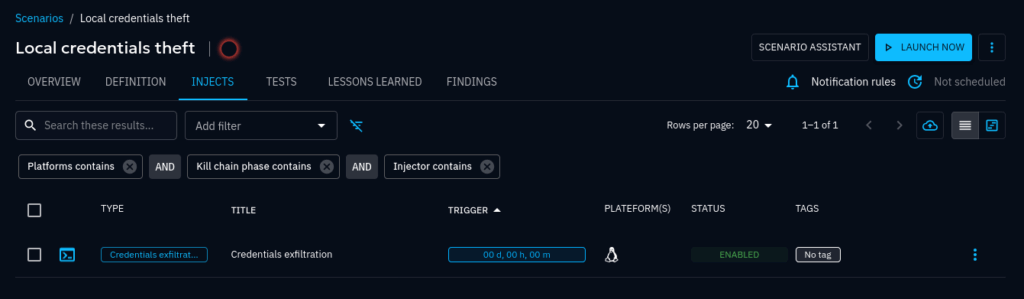
After we launch the Scenario, the Inject is scheduled and then executed: OpenAEV is then waiting for Expectation results to come in automatically via Collectors (the object of this article) or manually applied (an operator with enough privileges may override a result of an Expectation).
We can see this waiting state in the UI, where the Expectations are ready to receive results on the right hand side panel:
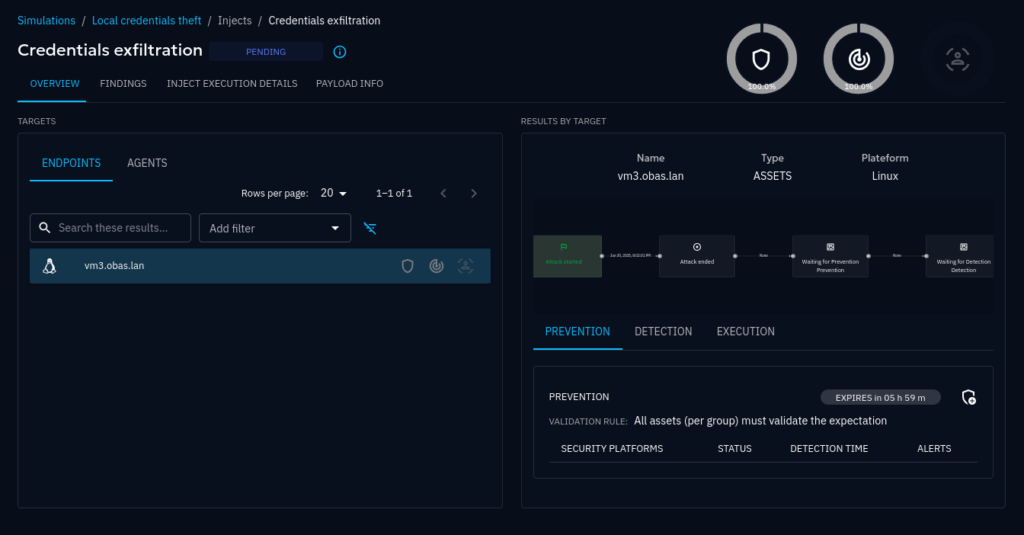
We would like to see these Expectations be filled in with results that state whether the Inject execution was Detected and/or Prevented. That way we know whether the assessed targets are protected against this particular attack pattern.
Now that the set is dressed, let’s explore the Collectors that fill in the blanks.
Overview of a Collector deployment
General Architecture
Referring to the general OpenAEV architecture, the scope of this subject study has been highlighted:
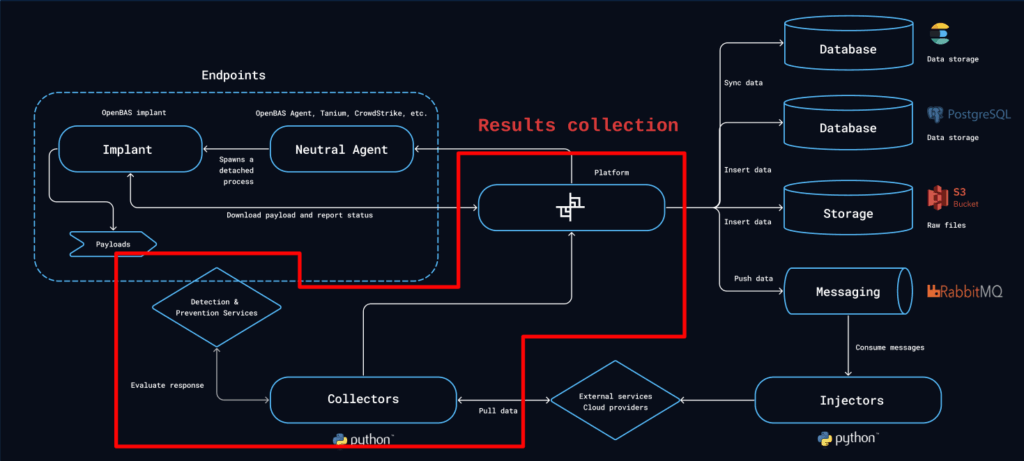
You’ll see that Collectors occupy a standalone box in the diagram; indeed, Collectors are intended to be independent processes, that connect to both Security Platforms and OpenAEV via their respective APIs; OpenAEV uses REST API.
As autonomous agents, Collectors must register with OpenAEV to be allowed to upload fetched results into the OpenAEV database. The list of currently registered Collectors may be found at the following address on any OpenAEV instance: /admin/assets/security_platforms.
Note that Collectors register within the “Security Platforms” list in OpenAEV. They are indeed the representation of the actual platform they connect with in order to feed back the results to OpenAEV. Therefore, the “Crowdstrike” Collector will appear as the “Crowdstrike” security platform in OpenAEV. Results fed back by this Collector will be stamped “Crowdstrike” so that we know at a glance the specific platform that contributed any given result.
Collector action lifecycle
A Collector is essentially a process that loops over a simple fetch-process-store data pattern.
Given that OpenAEV may schedule Injects to be executed at any time, the Collector watches for relevant results appearing within the Security Platforms data sets at any time.
Whenever a Collector is able to match a Detection or a Prevention from the Security Platform with an Inject’s Expectations, a new result is stored matching the outcome.
After a while, our Inject may present the following information, comparing with the screen’s state from the setup earlier:
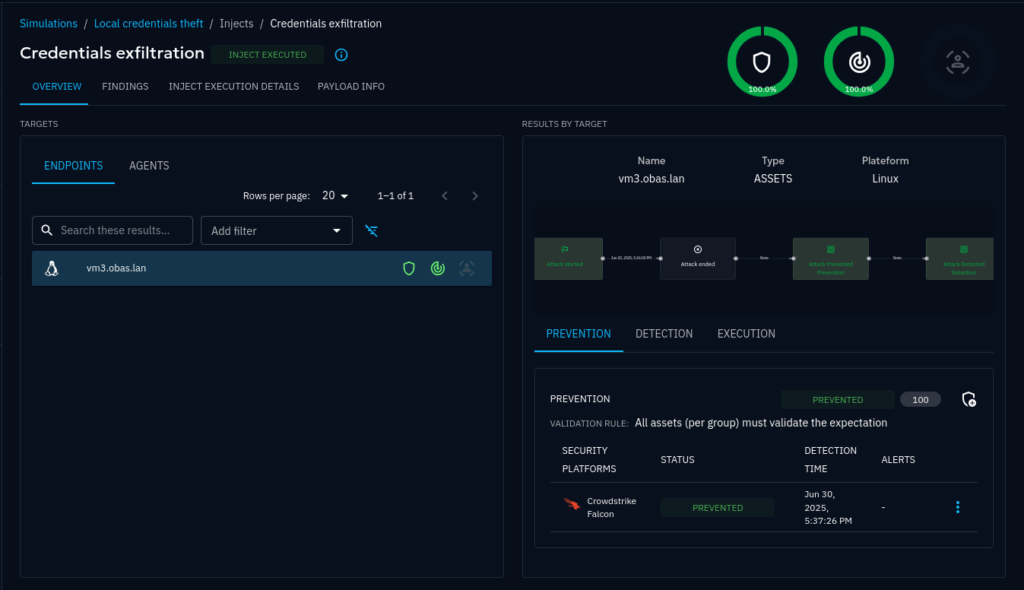
Both expectations reported that the Crowdstrike Falcon Collector found within its related security platform (the actual Crowdstrike Falcon platform) results that matched our Inject, and these results were that the execution was both Detected and Prevented. That’s great! We could reveal, via the OpenAEV ecosystem, that our endpoint was duly protected against local credentials theft by the Crowdstrike Falcon EDR.
TUTORIAL: Collectors in practice
We have demonstrated how useful Collectors are in bringing the outcome to the forefront. The OpenAEV ecosystem provides Collectors maintained by Filigran to connect with a growing number of industry-leading Security Platforms, with always more to come down the line. Let’s have a look at a couple real-world deployment scenarios.
Off-the-shelf Collectors by Filigran
Among the officially supported, first-party Collectors maintained by Filigran, we can find Python implementations for the Crowdstrike Falcon EDR and the Microsoft Sentinel SIEM. For a full, up-to-date list, refer to the OpenAEV Ecosystem documentation.
The easiest way to deploy any of these Collectors is to run it’s respective official Docker image. When OpenAEV is already deployed with Docker, it can be a matter of adding the Collector container to the Docker stack and setting the few configuration keys necessary for the Collector to register with OpenAEV and connect to the Security Platform.
Collector images are published periodically alongside the OpenAEV server image and can be found on Docker Hub: https://hub.docker.com/u/openaev.
Respective Collector documentation, notably configuration, can be found here, e.g.:
- Crowdstrike Falcon EDR Collector: https://github.com/OpenAEV-Platform/collectors/tree/main/crowdstrike
- Microsoft Sentinel SIEM Collector: https://github.com/OpenAEV-Platform/collectors/tree/main/microsoft-sentinel
Example: deploying a Crowdstrike Falcon EDR Collector using Docker
As a reminder, Collectors are typically standalone processes, and this is the case for all Filigran-maintained Collectors. That means a given Collector might execute anywhere, independently to where the OpenAEV instance itself executes, provided it can reach its REST API endpoints.
With that in mind, we might create a standalone Docker stack to solely execute our Collector container (refer to https://github.com/OpenAEV-Platform/collectors/tree/main/crowdstrike#configuration for the reference configuration keys):
services:
	crowdstrike_edr_collector:
		image: openaev/collector-crowdstrike:1.19.0
		environment:
		  - OPENAEV_URL=${OPENAEV_URL}
		  - OPENAEV_TOKEN=${OPENAEV_TOKEN}
		  - COLLECTOR_ID=${COLLECTOR_ID}
		  - CROWDSTRIKE_API_BASE_URL=${CROWDSTRIKE_API_BASE_URL}
		  - CROWDSTRIKE_CLIENT_ID=${CROWDSTRIKE_CLIENT_ID}
		  - CROWDSTRIKE_CLIENT_SECRET=${CROWDSTRIKE_CLIENT_SECRET}
docker-compose.yml
Note this Collector does not need persistent storage, hence no need to set up a docker volume.
Next, gather the necessary information to start the new container configured with the target environment.
OPENAEV_URL: an HTTP URL to the OpenAEV instance that is visible from the containerOPENAEV_TOKEN: a privileged (admin) API token from an admin account; find one by naivgating to an admin account’s profile page on OpenAEV and scroll down to find the API keys section
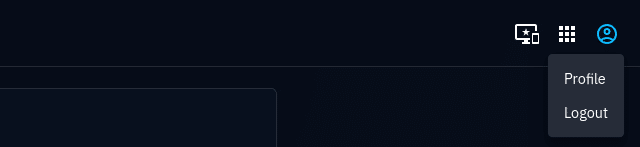
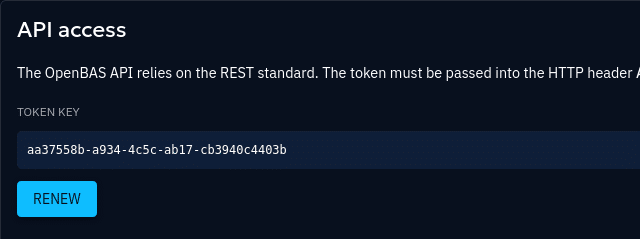
COLLECTOR_ID: a randomly generated globally unique string. UUIDv4 works great for this purpose.CROWDSTRIKE_*: these keys are related to an active OAuth2 credentials pair within a subscription to CrowdStrike Falcon. It is recommended to create dedicated credentials for the exclusive use of the collector. OAuth2 credentials are created in the CrowdStrike Falcon web UI, under Support and Resources → API clients and keys.
Note that the CrowdStrike Collector requires the Alerts: Read and Write privileges as per the documentation.
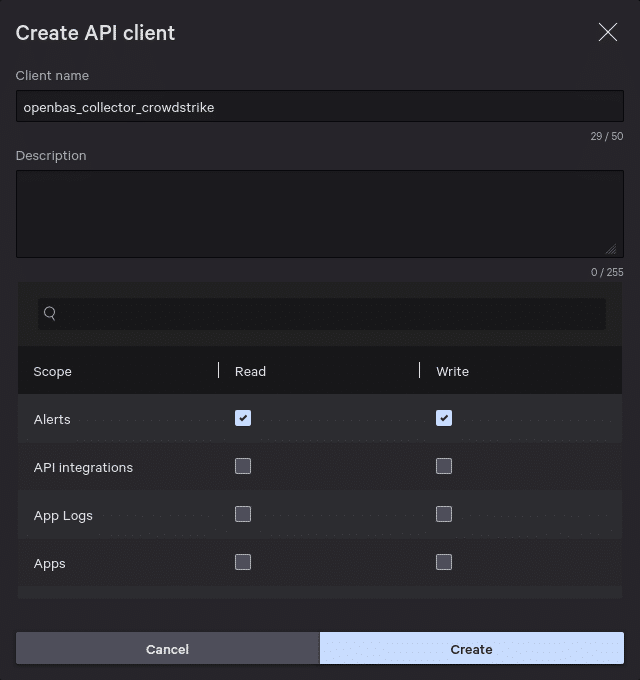
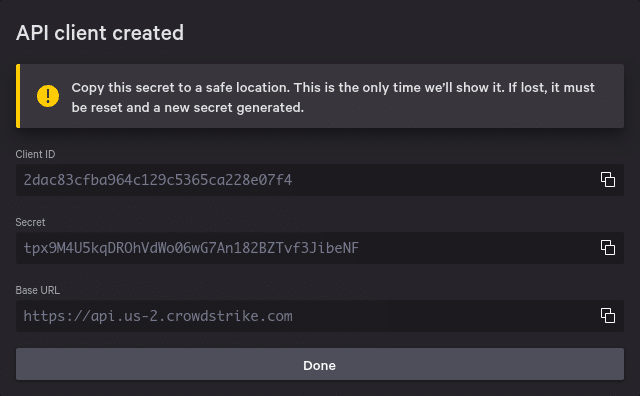
The correct
.env file would look like something along the lines of:
# The publicly facing root URL for the OpenAEV instance
OPENAEV_URL=https://openaev.corporate.example
# An admin-level API token; it can be found under API access at /admin/profile
OPENAEV_TOKEN=aa37558b-a934-4c5c-ab17-cb3940c4403b
# A globally unique string: OpenAEV handles UUIDv4 well for this
COLLECTOR_ID=6fab3a73-1a3e-4791-831c-946274a15407
# The URL for the Crowdstrike API. Depending on your subscription,
# it may contain a shard identifier, e.g. "us-2"
CROWDSTRIKE_API_BASE_URL=https://api.us-2.crowdstrike.com
# the following are the ID/secret pair provided with the Crowdstrike contract
CROWDSTRIKE_CLIENT_ID=2dac83cfba964c129c5365ca228e07f4
CROWDSTRIKE_CLIENT_SECRET=tpx9M4U5kqDROhVdWo06wG7An182BZTvf3JibeNF
Then launching the stack should animate the Collector, which would start watching for results:
$ docker compose up
{"timestamp": "2025-06-30T19:00:29.900566Z", "level": "WARNING", "name": "CrowdStrike Endpoint Security", "message": "DEPRECATED: this collector should be migrated to use <class 'pyobas.daemons.collector_daemon.CollectorDaemon'>."}
{"timestamp": "2025-06-30T19:00:30.947613Z", "level": "INFO", "name": "CrowdStrike Endpoint Security", "message": "Starting PingAlive thread"}
{"timestamp": "2025-06-30T19:00:31.738764Z", "level": "INFO", "name": "CrowdStrike Endpoint Security", "message": "No alerts ID found for this specific parameters :{'filter': \"timestamp:>'2025-06-30T18:15:30.947780+00:00'+type:'ldt'\"}"}
{"timestamp": "2025-06-30T19:00:31.738978Z", "level": "INFO", "name": "CrowdStrike Endpoint Security", "message": "Gathering expectations for executed injects"}
{"timestamp": "2025-06-30T19:00:31.752737Z", "level": "INFO", "name": "CrowdStrike Endpoint Security", "message": "Found 0 expectations waiting to be matched"}
Custom Collector implementation
If a Collector for the desired Security Platform is not detailed in the list of Filigran Collectors, it is still possible to implement a new one.
We recommend to use pyobas, the official Python client for the OpenAEV API, for implementing a new Collector.
The high-level steps for implementing a Collector are:
- Identify the Security Platform-specific configuration keys needed
- Create the skeleton code for the new Collector
- Implement the core logic for matching alerts from the Security Platform with Expectations in OpenAEV
The OpenAEV documentation has a section on how to implement a new Collector, with diagrams and code examples: Collector development.
Conclusion
In OpenAEV, Collectors are versatile components that fill in the gap between the Security Platforms’ results and their representation within the OpenAEV UI. As an OpenAEV instance may deploy any number of Collectors (for each desired Security Platform), a single OpenAEV instance can therefore monitor a varied collection of computer systems and their respective protection state with no other constraint than the existence of a Collector implementation for any desired Security Platform.
Next Steps
Collectors are a great way to extend OpenAEV’ functionality. We covered Detection and Prevention status for Injects, but there is no obstacle for covering other scopes, for example Human Response.
We want to hear from you
Do you have a question about Collectors, or any other aspect of OpenAEV? Visit the community portal on Slack, or visit the OpenAEV repositories of your choice to ask questions.
Learning further
Read more
Explore related topics and insights