From Data Lake to Data Swamp: How OpenCTI Keeps CTI Clear

Antoine Martins
Senior Customer Success Manager
-
 Copied!
 -
 Copied!
 -
 Copied!
TL;DR
- Structure your CTI data with statuses, labels, and custom vocabularies.
- Track CTI metrics in dashboards to monitor freshness, quality, and flow.
- Apply retention policies to prevent your data lake from becoming a swamp.
- Manage two layers of lifecycle: CTI object lifecycle (decay, statuses, exclusions) and platform governance (archival, deletion, trash bin).
Structuring the CTI Lake
A lake stays clear only if it’s filtered. In CTI, this means applying statuses, labels, and vocabularies to organize data and ensure analysts immediately understand what they are looking at.
Statuses act like markers on the water: active, expired, under review.
Labels classify the content: phishing, APT29, critical.
Custom vocabularies let each organization define its own taxonomy to match workflows.
Example: An indicator enters the lake labeled Unverified. Once enriched and sighted, it becomes Active IOC. If no sightings occur after 90 days, it is tagged as Expired, ensuring analysts don’t waste time fishing in murky waters.
How OpenCTI helps?
- Fully customizable statuses, labels, and vocabularies.
- Playbooks automation to assign or update statuses dynamically.
- Exclusion lists to filter out false positives and reduce noise.

Monitoring the Water with CTI Metrics
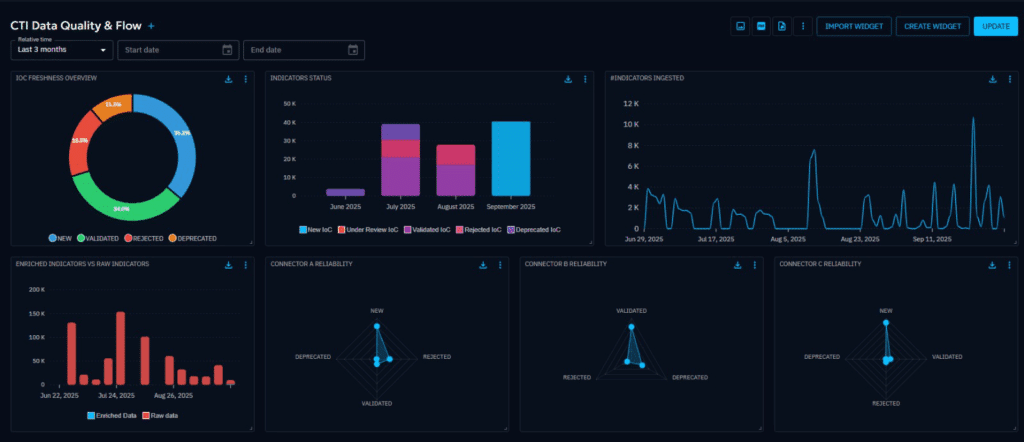
Even a well-structured lake needs monitoring. Without visibility, it’s impossible to know if the water is still clean. That’s why dashboards and CTI metrics are essential.
Metrics show the health of the data: how much is fresh, enriched, expired, or reliable. Dashboards give teams a clear view of the inflow and outflow of intelligence, ensuring the lake remains navigable.
Example: A dashboard highlights that 40% of active indicators have no enrichment. This CTI metric signals a problem upstream with connectors or enrichment workflows.
How OpenCTI helps?
- Native widgets for freshness, source reliability, and ingestion volumes.
- Custom dashboards to monitor CTI metrics relevant to your program.
- Audit logs for full traceability of how the data lake is managed.
Retention Policies: Preventing the Swamp
The greatest risk to a data lake is sediment: information that no longer matters but continues to pile up. In CTI, this is outdated indicators, obsolete reports, or duplicates that cloud visibility.
This is where retention policies matter. They ensure unused data is either archived or deleted, keeping the lake clear.
Example: Indicators older than 90 days are automatically expired. Campaign reports older than two years move to archival, staying available for research but removed from daily dashboards.

How OpenCTI helps ?
- Configurable retention rules per entity type.
- Trashbin workflow with adjustable grace periods before final deletion.
- Archival policies that preserve knowledge without polluting operational views.
Two Layers of Lifecycle Management
To prevent a data swamp, teams must manage lifecycle on two levels:
1. CTI Object Lifecycle
Manages intelligence entities individually.
- Decay rules reduce indicator confidence over time.
- Statuses and labels mark lifecycle stage.
- Exclusion lists filter out irrelevant or false data.
This keeps the intelligence itself actionable and reliable.
2. Platform Lifecycle Management
Manages the lake as a whole.
- Retention policies control how long data is kept.
- Archival vs deletion ensures balance between knowledge and efficiency.
- Trashbin secures deletions with the ability to override.
This keeps the platform sustainable, scalable, and trusted.
Conclusion
A CTI platform without lifecycle management is like a data lake left unattended: it turns into a swamp. Analysts lose trust, operations slow down, and valuable insights get buried.
With OpenCTI, organizations can:
- Structure their CTI data with statuses, labels, and vocabularies.
- Monitor quality and volume with dashboards and CTI metrics.
- Apply retention policies to keep the data lake clear and usable.
Data Lifecycle Management transforms cyber threat intelligence from a flood of information into a sustainable, navigable source of insights.
Enjoy and feel free to ask any questions about it on our Slack community channel !
Read more
Explore related topics and insights