Deploy OpenBAS Agents Like an Adversary and Validate Your Security Posture

Damien Goujard
Senior Software Engineer - OpenBAS

Hedi Tarchouni
Senior Software Engineer - OpenBAS

Sébastien Miguel
Product Manager - OpenBAS

Stephanya Casanova
Senior Software Engineer - OpenBAS
-
 Copied!
 -
 Copied!
 -
 Copied!



In OpenBAS 1.14, our Adversarial Exposure Validation (AEV) platform, we introduced new methods for installing the OpenBAS Agent. This update marks a significant step in our ongoing efforts to enhance performance, optimize functionality, and improve the overall user experience.
By supporting new installation modes, we expand the possibilities for users to simulate a wider variety of attack scenarios and strengthen their security posture. Different installation modes allow the Agent to operate under various privilege levels, such as standard user accounts or administrative contexts. This flexibility is essential, as some attack simulations require specific permissions to accurately reflect real-world threats.
These improvements make the Agent more adaptable and capable of assessing the human-side of readiness.
TL;DR
- New agent installation modes simulate attacker behavior using standard or admin privileges.
- Agents can now run as domain users to mimic real-world credential-based threats.
- Simulate full post-compromise flows: enumerate shares, extract credentials, and test lateral movement.
- Centralized findings and detailed metrics help assess detection, prevention, and analyst response.
Context
The OpenBAS Agent is a key component of the OpenBAS platform, responsible for registering an endpoint, retrieving assigned tasks, and forwarding them to implants for execution on the target machine.
Developed in Rust for performance, safety, and portability, the Agent runs silently in the background and doesn’t perform any actions directly to the endpoint to ensure simulations run without interference and with realism. It supports multiple operating systems, including Windows, Linux, and macOS. Its lightweight, neutral behavior makes it ideal for conducting comprehensive security assessments across varied environments.
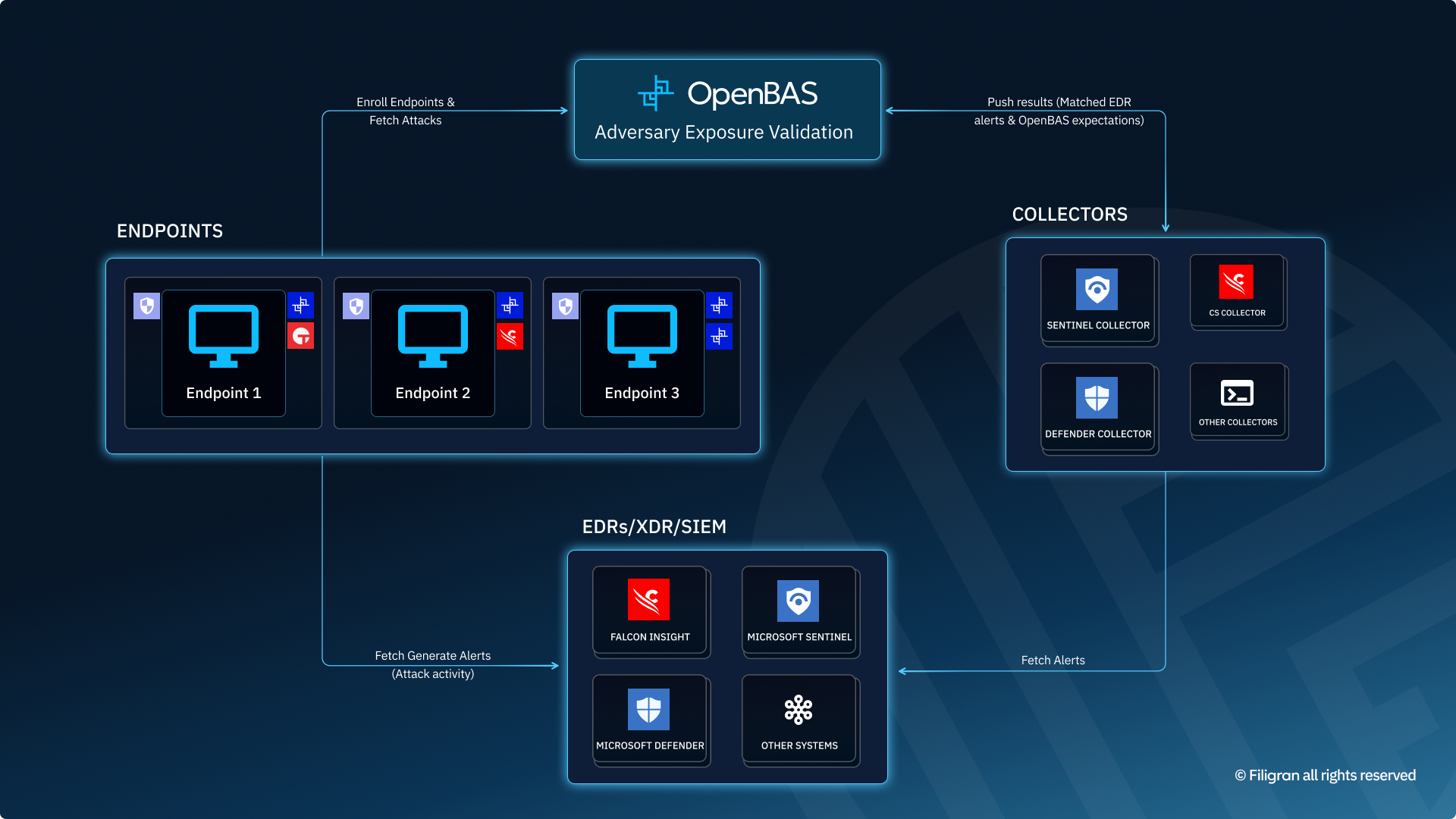
The diagram below illustrates how the OpenBAS Agent operates within a typical architecture:
- interfacing with the OpenBAS platform.
- interacting with endpoint detection and response (EDR) like Microsoft Defender for Endpoints or CrowdStrike, SIEM with Microsoft Sentinel.
- communicating with collectors to support simulation orchestration.
Installation Modes
OpenBAS now supports three modes of installations for the Agent, each using different mechanisms and privileges levels.
Session User
The default one is what we call Session User. This installation doesn’t require specific permissions and can be installed by a user without admin access. The process will be attached to the user who installs the agent. Session User allows both Admin and non-Admin agents. For this mode of installation, we use systemctl or launchctl for Linux/MacOS, and the Agent will have Admin privileges if the user installing it has admin rights. For Windows, we use a scheduled task when the Agent is installed from a terminal with Admin privileges, or we write a startup application in the registry if it is a standard terminal.
Then we have two modes of advanced installations that both require admin access and use systemctl/launchctl for Linux/MacOS and Windows services for Windows.
Service system
The installation that we call Service System (this mode of installation used to be our default). This installation will use the “root” user on Linux and MacOS and “nt authority/system” on Windows.
Service user
The third installation is Service User. It is very similar to Service System but allows you to specify a user that will own the agent. When you run the install command, you will have to specify user’s credentials and the process will be owned by this user.
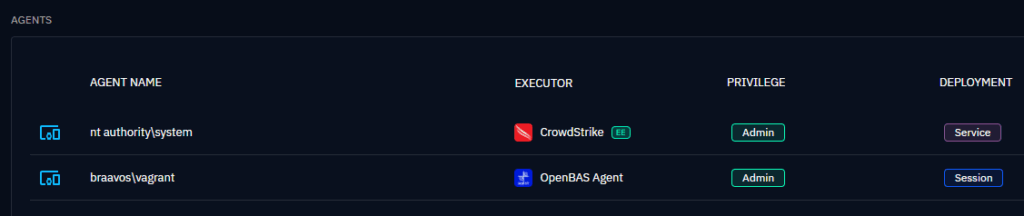
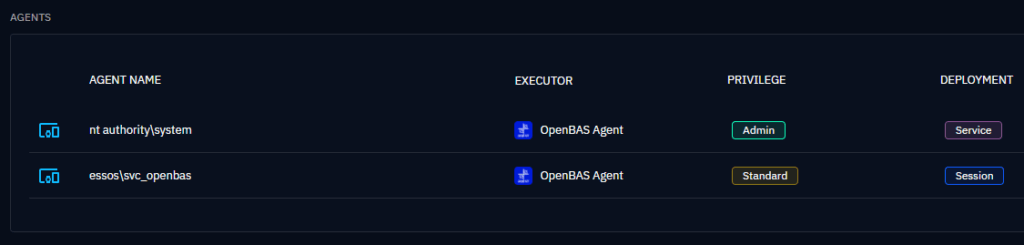
💡On one machine, you can have several agents running with different installation modes or under different users. Only the Service System Agent is limited to one instance per machine—there are no constraints for the others.
Let’s take a concrete example. On a single machine, you can install:
Use Case Overview
Simulating Credential Abuse with OpenBAS: Deploy Agents as Domain Accounts
In modern attack simulations, realism is key. It’s not just about mimicking malicious actions—it’s about doing so in a way that mirrors how attackers actually operate within your environment.
A major step forward in this direction is now possible with OpenBAS:
You can deploy an agent under the identity of any domain user account—not just local SYSTEM or admin accounts.
Why This Matters
After compromising a machine, real attackers often don’t need to escalate privileges. Instead, they rely on legitimate, often overlooked, domain user accounts—especially service accounts—to move laterally, explore the environment, and maintain persistence.
This new capability in OpenBAS allows you to simulate exactly that:
- Run actions under a domain account, just like an attacker would with stolen credentials.
- Measure how far a compromised account can go, without relying on SYSTEM-level privileges.
- Test your detection and response capabilities against subtle, credential-based movements—not just noisy privilege escalations.
A Realistic Scenario
Picture this:
- An attacker compromises a standard workstation.
- They enumerate network shares and stumble upon cleartext credentials for a domain service account.
- Instead of using elevated rights, they simply reuse those credentials to authenticate elsewhere and continue their operation.
With OpenBAS, you can replicate this flow end-to-end:
- Enumerate targets.
- Identify credential exposure.
- Authenticate with those credentials.
- Deploy and operate an agent under the compromised domain account.
This is how real threats behave—and now, so can your simulations.
Designed for Subtlety and Accuracy
Since the OpenBAS agent communicates over HTTPS, just like common attacker toolkits, it blends naturally into your network traffic. Combined with domain-context execution, this enables simulations that:
- Stay under the radar.
- Reflect real attacker tradecraft.
- Provide high-fidelity insight into your organization’s lateral movement risks.
Scenario Walkthrough: Exploring Guest-Accessible Servers and Hunting for Credentials
In this first screenshot, we walk through the initial stage of our attack simulation, made possible through OpenBAS.
The scenario is designed to replicate a common post-compromise tactic: an attacker lands on a machine inside the network and begins probing for low-hanging fruit—servers that expose shares without requiring authentication.
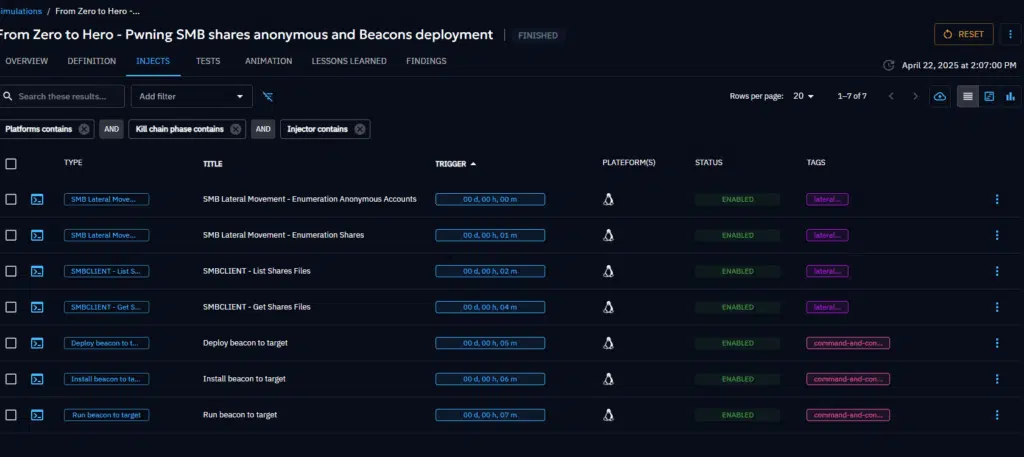
Here’s what happens, step by step:
- Enumeration of Guest-Accessible Servers The simulation starts by scanning the local network for Windows servers that respond to SMB and accept guest or unauthenticated connections. This helps identify misconfigured assets that may allow anonymous access.
- Discovery of File Shares Once these targets are found, the scenario attempts to enumerate file shares on each server. We check which shares are accessible and whether the current user (guest or compromised) has read and/or write permissions.
- Crawling for Sensitive Files On shares with read access, we perform a recursive scan of the file structure, looking for files that could contain sensitive information—such as scripts, configuration files, or password dumps.
- Credential Extraction If such files are found, the scenario uses pattern-matching logic to extract cleartext credentials (usernames, passwords, or NTLM hashes) directly from the file content.
- Preparing for Lateral Movement Any credentials recovered at this stage are saved for later use. The idea is to simulate what an attacker would do next: attempt lateral movement using these stolen credentials.
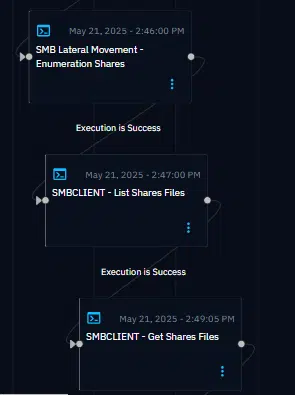
This phase is purely reconnaissance and collection—but already, it highlights dangerous gaps:
- Servers with overly permissive share settings.
- Sensitive data exposed to unauthenticated users.
- The risk of credential leakage through poor file hygiene.
In the next stage, we’ll use these credentials to pivot deeper into the network—just like a real attacker would.
Insights from the Simulation – Findings Overview
In this screenshot, we see the consolidated findings generated throughout the simulation. One of the key strengths of OpenBAS lies not just in simulating realistic attack behavior, but also in making the results immediately actionable and understandable.
Each phase of the scenario—whether it’s scanning servers, browsing shares, extracting credentials, or attempting lateral movement—feeds data back into a centralized view. Here’s what you can observe:
- At the scenario level, you get a high-level summary of what was discovered: vulnerable servers, accessible shares, and potential paths for lateral movement.
- At the simulation level, you can trace exactly what actions were performed, by which agent, and under which account.
- At the inject level, the details are even more granular: You can see which IPs responded to unauthenticated SMB connections, which file shares were browsed, what files were accessed, and whether any credentials were found inside.
This structured breakdown allows defenders to:
- Quickly identify weak points in configuration (e.g., shares with guest access).
- Pinpoint exposed credentials and trace where they came from.
- See the exact path an attacker could follow, step-by-step, based on what’s discovered.
It’s not just visibility—it’s clarity. Findings are contextualized within the simulation, making it easier for teams to prioritize remediation and communicate risk effectively.
In the next phase, we’ll show how these findings are used to pivot and deploy an agent using recovered credentials, simulating a realistic lateral movement attempt.
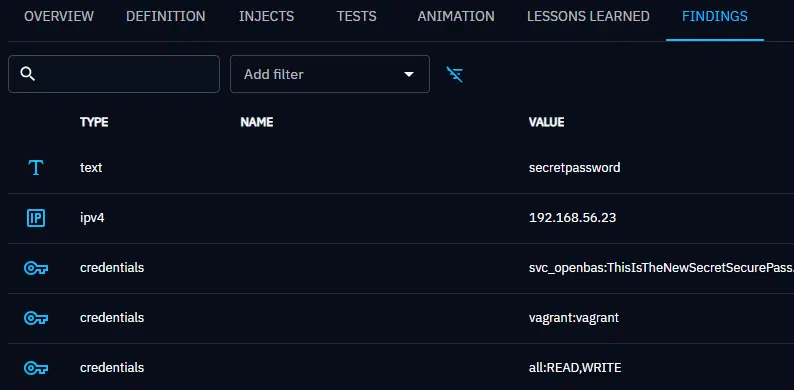
In this screenshot, we get a clear and immediate overview of the simulation’s findings—an essential capability when assessing real-world risk.
Key indicators
At a glance, several key indicators stand out:
- A file named
secretpasswordwas identified, strongly suggesting the presence of hardcoded or stored credentials. - The server
192.168.56.23has been flagged—likely because it accepted unauthenticated SMB connections, making it an ideal target for an attacker. - The folder
/allon that server was accessible in both read and write, a critical misconfiguration. - Two sets of credentials were recovered:
- A weak
vagrant:vagrantpair. - A domain-like account
svc_openbaswith an exposed password.
- A weak
This level of visibility allows security teams to immediately assess the attack surface and identify exploitable vectors, without digging into logs or packet captures.
From Discovery to Action: The Next Step
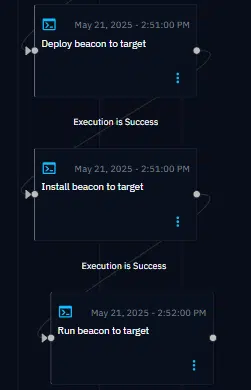
With credentials in hand, the scenario can now attempt lateral movement, deploying a new OpenBAS agent (“beacon”) on a remote system using one of the discovered accounts.
If authentication is successful:
- The agent will be deployed under the context of that account (e.g.,
vagrantorsvc_openbas). - The action will be visible both at the inject level, showing the credential-based access attempt, and in the endpoint view, confirming successful deployment.
Measuring Security Performance: Detection, Prevention & Human Response
Now that the scenario has completed, it’s time to shift focus from simulation to evaluation:
Did our security controls detect or stop the attack? Did our analysts interpret it correctly?
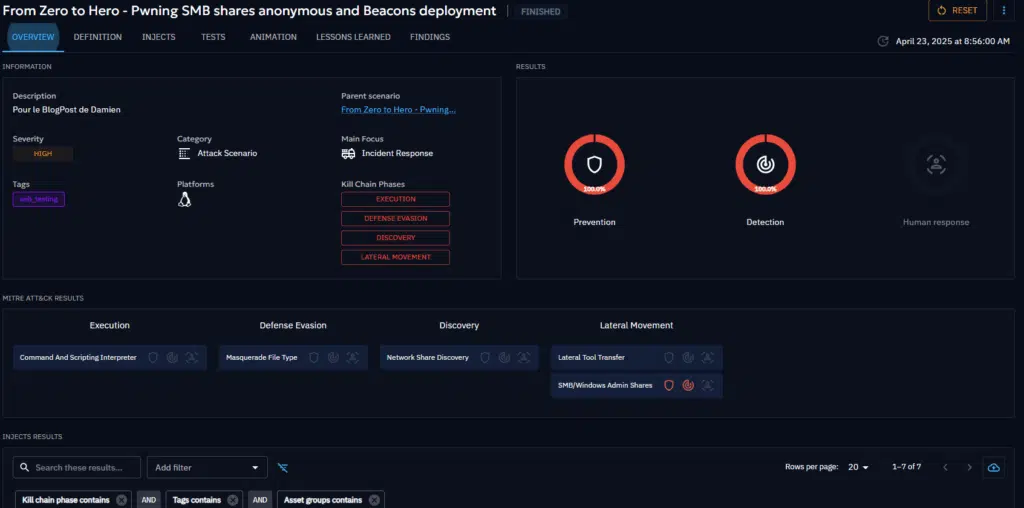
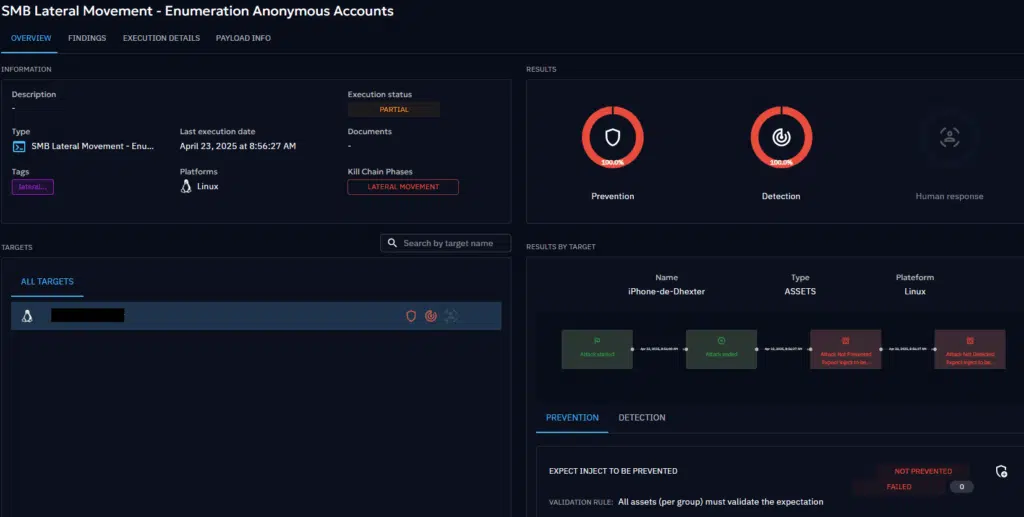
This screenshot shows the detection and prevention results captured at the scenario level—offering a comprehensive view of how your security ecosystem responded to each simulated step.
Here’s what each section represents:
- Prevention: Indicates whether an action (inject) was actively blocked—by an EDR, a proxy, or another control. For example, if a payload was quarantined before execution or a network request was blocked outright.
- Detection: Signals that the inject was successfully executed, but detected by a security monitoring tool—such as a SIEM, NDR, or EDR—without preventing the action.
- Human Response: Captures the reaction from the SOC team. Analysts can comment on each detection, classify it (e.g., true positive vs. false positive), and indicate the level of suspicion. This helps measure not just tool visibility, but also analyst accuracy and response quality.
We can click on the first inject not executed to know more about the issue.
At the end (exercise ended with success or with error), in the overview, we will have the global results for the exercise…
- Percentage of expectations results (average of each inject),
- Percentage of Mitre Att&ck results (average of each inject),
- Injects results,
- Some statistics.
From Global Summary to Per-Inject Detail
The great thing about this view is that it works on multiple levels:
- At a high level, you get a full picture of the scenario’s coverage—how much was blocked, detected, or missed.
- If you want to dig deeper, you can drill down into each individual inject to understand:
- Execution traces and status results for each target,
- Percentage of expectations results for each target,
- Global percentage of expectations results and its details,
- Global status result.
This allows teams to:
- Correlate specific findings with security telemetry.
- Spot gaps in visibility (e.g., lateral movement not triggering alerts).
- Identify detection blind spots—even for non-SYSTEM, credential-based access.
From Simulation to Real Insight
Ultimately, this view closes the loop: it connects attacker behavior to defensive reaction.
You don’t just simulate a threat—you measure your actual ability to detect, prevent, and respond to it.
It’s not about scoring points. It’s about improving resilience, one scenario at a time.
What’s Coming Next
Autonomous, Adaptive Scenarios
Even more exciting: in the near future, OpenBAS will support the ability to dynamically chain findings between injects.
In practical terms, that means:
- The IP address discovered here could be automatically reused in a follow-up inject to enumerate shares.
- Recovered credentials could be passed into authentication steps without manual configuration.
- Entire scenarios will adapt on-the-fly based on what the agent discovers, creating fully autonomous attack chains that mirror real attacker behavior more closely than ever before.
Conclusion
More Than Just Access—It’s Contextual Simulation
The ability to deploy agents as domain accounts is more than a feature—it’s a shift in how we emulate threats. For CISOs, it means:
- Testing how well your systems and teams handle credential misuse.
- Identifying excessive privileges tied to service accounts or standard users.
- Improving defenses where attackers are most likely to operate.
OpenBAS brings you closer to reality—because that’s where threats live.
You have now learned how the different OpenBAS Agent installation modes work, how to execute attacks, and how to analyze your organization’s security posture.
This was just a basic example. The platform supports much more complex scenarios, we encourage you to explore the documentation, our payloads github repository and check the other blog posts to create more and more complex exercises.
The combinations are infinite ! Enjoy and feel free to ask any questions about it on our Slack community channel 📢!
Read more
Explore related topics and insights